Proxy authentication: IP binding, login and password, and what 407 really means
A collection job of mine stopped at 02:40 on a Tuesday with 38 workers reporting one line each: HTTP/1.1 407 Proxy Authentication Required. The pair in the config was correct. I pasted the same user and the same password into curl by hand and the request went through on the first attempt. Same host, same port, same credentials, one machine getting in and the other refused, and the difference took me until morning to find.
The password carried a # character. On the command line curl received it as its own argument and passed the bytes through untouched. The worker read that password out of a URL string, where # opens a fragment, so everything after it was discarded before the header was ever assembled. The proxy got a shorter password, refused it correctly, and reported the refusal with the one status code it has for that job.
Most of the 407 tickets I have closed look like that. The pair is right and the transport around it is wrong. Below is how the two access doors work, what each one costs in daily use, how the choice shifts by the way you work, and how to read a 407 down to a cause with commands that take under a minute. The figures come from 214 tickets I tagged with that code over eleven months of running pools for a collection team.
Two doors into the same address
A proxy has to answer one question before it forwards anything: does this connection belong to somebody who paid for it. There are two ways to answer, and both are ordinary features of a private pool.
Binding by address is the first. I open the panel, add the public address my machine goes out from, and the node starts accepting connections from it. Nothing travels with the request. The proxy reads the source address off the TCP connection, compares it against the list attached to my account, and either forwards the traffic or refuses. The config on my side holds a host and a port. There is no secret in it at all, which means the file can sit in a repository, in an image layer or in a screenshot without costing me anything.
Login and password is the second. Every new connection carries a pair, the node checks it against the account, and the source address plays no part in the decision. The pair travels with me. I can work from the office, from a hotel, from a client's network, and the same string in the same config keeps working everywhere.
Those two sentences hide the whole trade, so here it is laid out by property.
| Property | Binding by address | Login and password |
|---|---|---|
| What the node checks | source address of the TCP connection | credentials inside the request |
| What the config holds | host and port | host, port, user, password |
| Moving to a new network | access stops until the list is updated | works with no change |
| Who appears in the access log | the address | the account name |
| A copied config file | useless to anyone off the list | full access for whoever holds it |
| Cost of revoking one operator | remove one address from the list | rotate the pair for everyone sharing it |
| Failure signal | 407 with no challenge you can satisfy | 407 that names a scheme to answer in |
| Number of places to edit on rotation | one panel field | every client that stores the pair |
Both doors can be open on the same address at once, and on my own pool they usually are. The binding covers the servers whose addresses never move, the pair covers the laptops. I keep a private pool bound to my own address for the fixed machines and hand out named pairs to the people who travel, so the access log tells me which of the two came in without me having to correlate anything.
What the 407 actually carries
A 407 is a question, not a verdict. The proxy is saying that it needs credentials and naming the form it will accept them in. The line that matters sits in the response header:
> CONNECT api.example.net:443 HTTP/1.1
> Host: api.example.net:443
> User-Agent: curl/8.6.0
>
< HTTP/1.1 407 Proxy Authentication Required
< Proxy-Authenticate: Basic realm="node07-collect"
< Content-Length: 0
<
> CONNECT api.example.net:443 HTTP/1.1
> Host: api.example.net:443
> Proxy-Authorization: Basic dXNlcjE3OnMzY3IzdA==
>
< HTTP/1.1 200 Connection established
The first 407 in that exchange is normal traffic. A client that has no reason to guess sends the tunnel request bare, reads the challenge, and repeats the request with the pair attached. Two round trips, one of them ending in 407, and the connection works. Any log that counts 407 responses without counting attempt numbers will show you a wall of errors on a system that is behaving perfectly.
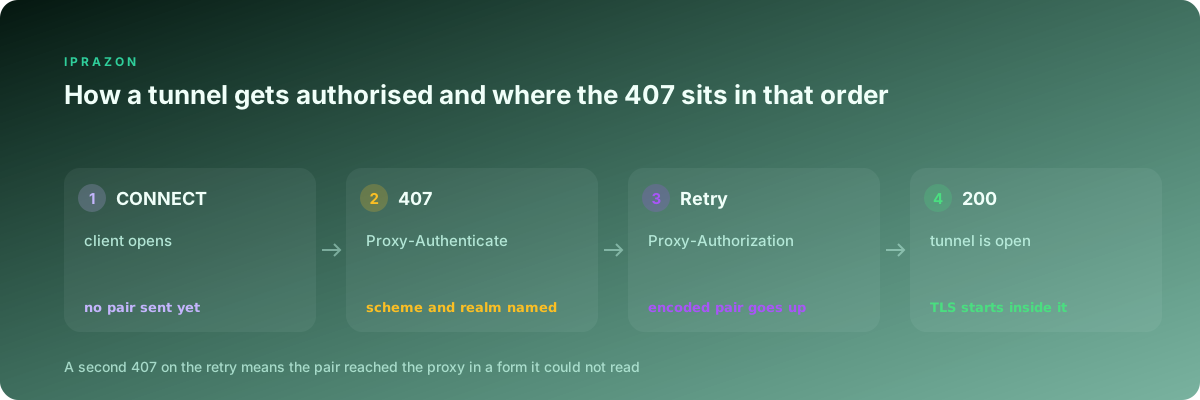
The second 407, the one that arrives after the pair went up, is the real report. It says the proxy read something and disliked it.
Two header names get confused constantly, and the confusion produces an unkillable 407. A 401 from a website is answered with Authorization. A 407 from a proxy is answered with Proxy-Authorization. A client that writes the pair into the first field sends it straight through the tunnel to the target site, which has no idea what to do with it, while the proxy keeps seeing a request with no credentials and keeps replying 407. I have watched that loop run for six hours in a retry wrapper.
The scheme word after the header name is the second thing to read. Basic means base64 of the user, a colon and the password, no hashing of any kind. Digest means a challenge and response with a nonce. NTLM and Negotiate show up on corporate gateways and are bound to the connection, so they survive keepalive and die on every reconnect.
The label in quotes after the scheme names the node that answered. That field earns its keep when there are two proxies in the path, since a corporate gateway on the office network answers first and its label is nothing like the one my own node prints. Reading that string has saved me from debugging the wrong machine more than once.
One operator on one machine
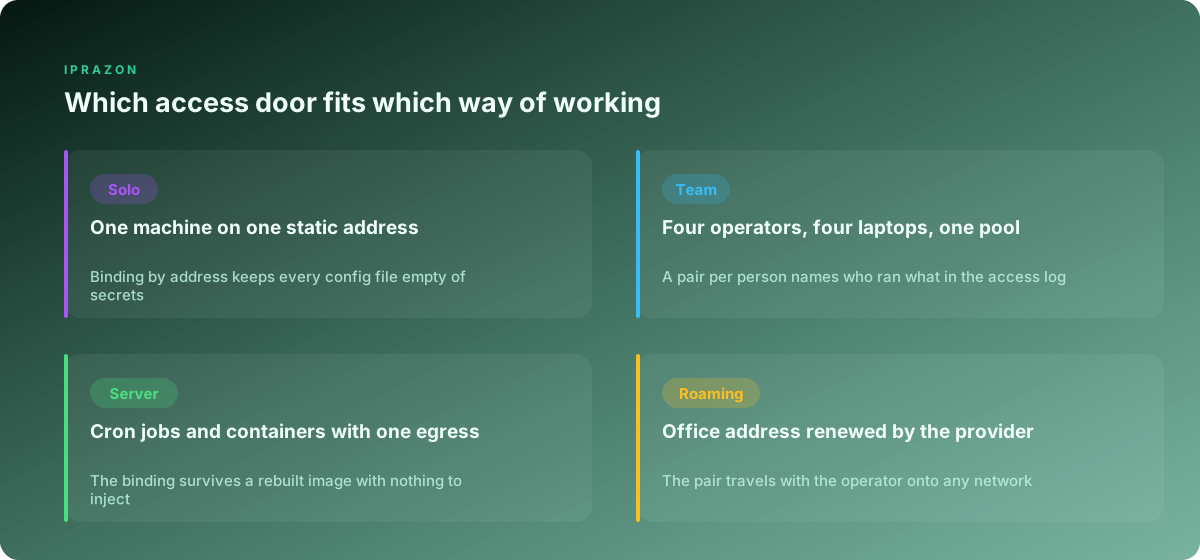
This is the simplest case and the one where binding by address wins on comfort. One laptop, one static address at home or in the office, one person. The address goes into the panel, the config holds a host and a port, and no secret is ever written to disk.
The check takes one command and no credentials at all:
curl -sS -o /dev/null \
     -w 'target=%{http_code} tunnel=%{http_connect} exit=%{exitcode}\n' \
     -x http://node07.example.net:8080 \
     https://api.ipify.org
tunnel=200 means the node accepted the connection, so the binding is live. tunnel=407 on a setup with no pair configured means one thing only: the address I am going out from is off the list. Before touching the panel I confirm what that address actually is.
curl -s --max-time 8 https://api.ipify.org; echoThat number is what the node sees. On my own line it changed twice in a year without any notice from the provider, and both times the first symptom was a job that had run untouched for months answering 407 at three in the morning. Binding is the door I keep for a machine that stays put, and I take IPv4 endpoints that keep the same host and port for exactly that reason, since the entry point in the config outlives every project that uses it.
There is a second reason to prefer the binding when you work alone. Nothing in the tool chain can mangle a password that does not exist. Every failure mode in the second half of this piece comes from moving a string through parsers, and a config with no string in it skips all of them.
A team of four sharing one pool
The moment a second person needs the same addresses, the calculus turns over. Four operators on four laptops on four networks cannot all be bound by address, and one shared pair means the access log says nothing useful.
So the pool gets a pair per person. The account name in the log becomes a name I recognise, per-user rate counters start making sense, and an operator leaving the team costs one revoked pair with nobody else interrupted. I keep private endpoints issued to one operator and hand each of the four their own pair on it, because a per-person pair only tells the truth when the addresses behind it stay inside the team.
Where the pairs live matters more than how they are generated. My working order, from the storage I trust most to the storage I tolerate:
| Where the pair sits | Who can read it | What it costs to rotate | Where I use it |
|---|---|---|---|
| Team password manager, per-person entry | the operator alone | one entry, one person | laptops, manual work |
| Environment file with mode 0600 on the host | the service account | one file, one restart | servers and daemons |
| Secret store injected at container start | the running process | one store update | container fleets |
| CI variable marked as masked | the pipeline job | one project setting | scheduled collection |
| A line in a config file inside the repository | everyone with a checkout, forever | rotate for the whole team | nowhere |
The last row is the one I have actually had to fix. A pair reached a public repository through a .env file that somebody added to a commit for convenience, and rotating it meant touching nine machines in an afternoon. Since then the rule on my team is short. Repositories hold the shape of the config and never the values.
Swapping a contractor out is the case that proves the layout. When a freelancer finished a collection job for me, the handover was one revoked pair and one new pair issued to the person taking over, and the other three operators never noticed anything. With a single shared string the same handover means a rotation on every laptop, plus a day of stragglers reporting 407 because one config was missed. The incoming contractor usually works from an address I have no way to bind, so the pair travels to them through the password manager, the node accepts it from the first request, and the access log carries a name I recognise from the first minute of their work.
The check for a shared pool is the same request run under each person's pair, so a failure points at a person and not at the node:
curl -sS -o /dev/null -w '%{http_code} %{time_total}\n' \
     --proxy-user "$PROXY_USER:$PROXY_PASS" \
     -x http://node07.example.net:8080 \
     https://api.ipify.org        # each operator runs this on their own machine

printf '%s' "$PROXY_PASS" | od -c | tail -n 2   # catches a stray newline in the value
--proxy-user keeps the pair out of the URL, so the shell and the URL parser never see it. That single habit removed the whole class of character problems from my team's laptops in one afternoon.
Servers and jobs that nobody watches
An unattended host is where binding by address earns its place again. The egress address of a server is fixed, known and mine, so the node can recognise it with no credentials in the image, in the environment, in the build cache or in the process list.
That last one deserves attention. A pair passed on a command line is visible in ps output to every user on the box, and it lands in the shell history file of whoever typed it. On a shared build host that is a wide door.
When a pair is needed anyway, because the job runs somewhere with a changing egress, I keep it in a file the service account owns and nothing else can read:
sudo install -m 0600 -o worker -g worker /dev/null /etc/proxy/worker.env
printf 'PROXY_USER=svc-collect\nPROXY_PASS=%s\n' "$PW" | sudo tee /etc/proxy/worker.env >/dev/null
The unit at /etc/systemd/system/collect.service then points at that file and repeats no value of its own:
[Service]
User=worker
EnvironmentFile=/etc/proxy/worker.env
ExecStart=/opt/collect/run.py
The verification has to run as the service account, since a check that passes for root and fails for worker is the most common false clearance in this whole area:
sudo -u worker sh -c 'set -a; . /etc/proxy/worker.env; set +a; \
  curl -sS -o /dev/null -w "%{http_code}\n" \
  --proxy-user "$PROXY_USER:$PROXY_PASS" \
  -x http://node07.example.net:8080 https://api.ipify.org'
I wire the same call into the healthcheck of every worker container with a 10 second timeout, so a 407 shows up as a failed container at the moment the pair goes stale. My fleet runs server addresses with a panel for the binding list, which lets a provisioning script register a new host's address at boot and keeps the whole fleet on the credential-free door. For long running jobs I hold the endpoints on a monthly term that keeps the pair stable, because a config that survives untouched from one pass to the next is a config I can compare against last week when a number looks strange.
An office address that moves under you
A provider that renews the office address every few days breaks the binding on its own schedule, and the break always announces itself as 407.
Three ways out of that, all of which I have run.
The first is a pair. Credentials ignore the address entirely, so a changing egress stops being an event. On networks I do not control, a client's office, a co-working floor, a hotel, this is the only door that works at all.
The second is a small jump host with a fixed address. The laptop connects to it over SSH, the host holds the binding, and the address the node sees never moves. One ssh -D 1080 gives me a local SOCKS5 entry point and the whole chain reduces to a single stable egress. It costs one machine and buys back the credential-free config on every laptop behind it.
The third is a script that keeps the binding current. Most panels expose an endpoint for the address list, so a five minute timer can compare the current egress against the last known one and update on change:
#!/bin/sh
STATE=/var/lib/proxybind/current
CUR=$(curl -s --max-time 8 https://api.ipify.org)
[ -z "$CUR" ] && exit 0
[ "$CUR" = "$(cat $STATE 2>/dev/null)" ] && exit 0

curl -sS -X POST https://panel.example.net/api/binding \
     -H "Authorization: Bearer $PANEL_TOKEN" \
     -d "ip=$CUR" \
  && printf '%s' "$CUR" > $STATE \
  && logger -t proxybind "bound $CUR"
The gap between the address changing and the timer firing is real, and on a five minute interval I measured it at 84 seconds on average across 31 renewals. Jobs that run through that window see a short burst of 407 and recover. Jobs that treat 407 as fatal stop for the night, which is why my workers retry that code with a backoff and only alert after the fourth failure in a row.
The check here is a comparison, and it takes two lines:
curl -s https://api.ipify.org; echo          # what the node sees now
curl -s -H "Authorization: Bearer $PANEL_TOKEN" \
     https://panel.example.net/api/binding    # what the node has on file
When those two disagree, the cause is found and no packet capture is needed.
The pair is right and the characters are not
Now the half of the ticket pile where the credentials are correct on screen and the proxy still refuses them.
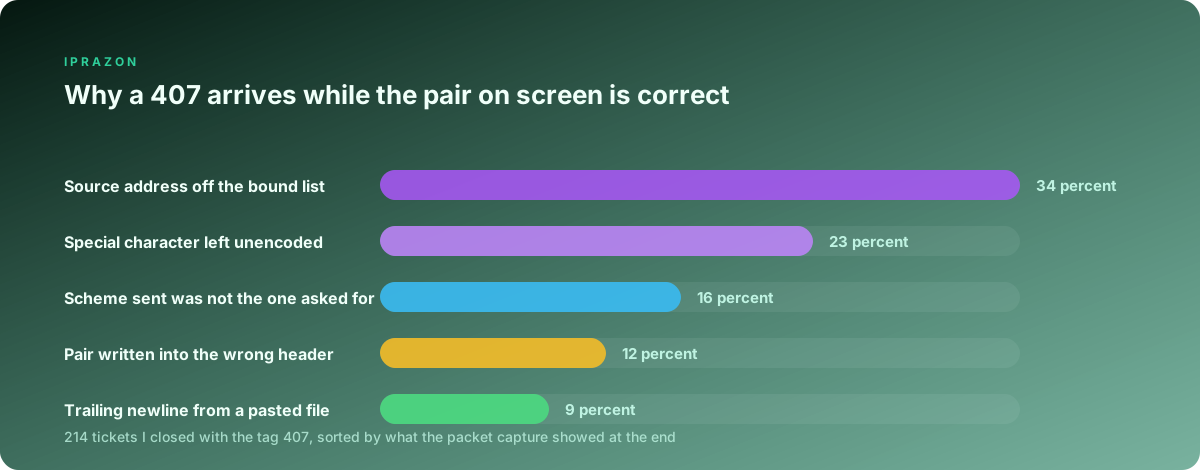
The URL form is where most of it happens. Writing http://user:pass@host:port puts a password inside a structure that has its own reserved characters, and a parser obeys the structure before it obeys my intent.
| Character in the password | What the URL parser does with it | Percent-encoded form |
|---|---|---|
@ | splits the credentials there, host becomes garbage | %40 |
: | ends the user name early | %3A |
/ | ends the authority, the rest becomes a path | %2F |
# | opens a fragment, everything after is dropped | %23 |
? | opens a query string | %3F |
% | starts an escape sequence of its own | %25 |
| space | truncated or rejected depending on the client | %20 |
Encoding it properly takes one call in any language, and I do it at the point where the URL is assembled:
import os, requests
from urllib.parse import quote

user = quote(os.environ["PROXY_USER"], safe="")
pw   = quote(os.environ["PROXY_PASS"], safe="")
url  = f"http://{user}:{pw}@node07.example.net:8080"

s = requests.Session()
s.trust_env = False                    # ignore whatever the shell exported
s.proxies = {"http": url, "https": url}
r = s.get("https://api.ipify.org", timeout=20)
print(r.status_code, r.text)
Three more character faults account for the rest of that group. A password copied out of a text file on a Windows machine arrives with a carriage return attached, and od -c shows it as \r sitting before the \n at the end of the value. A password pasted from a chat client can carry a zero-width character that no editor displays. A password with accented letters encodes to different bytes in different clients, since Basic historically assumed one byte per character and modern clients send UTF-8, so the same visible string produces two different base64 strings.
The way to settle all three in ten seconds is to build the header by hand and compare it against what the client actually sent:
printf '%s' 'user17:s3cr3t' | base64
  # dXNlcjE3OnMzY3IzdA==

curl -sv -o /dev/null \
     --proxy-header 'Proxy-Authorization: Basic dXNlcjE3OnMzY3IzdA==' \
     -x http://node07.example.net:8080 https://api.ipify.org 2>&1 \
  | grep -iE '407|proxy-auth|Connection established'
If the hand-built header opens the tunnel and the configured one does not, the credentials are fine and the client is losing bytes somewhere between the config and the socket. Note --proxy-header there. Plain -H sends the line to the target site through the tunnel, where it does nothing at all, and that mix-up has produced its own small pile of tickets on my desk.
The pair is right and the scheme is not
The second family of stubborn 407s comes from answering in a form the node did not ask for.
A client that sends Basic at a node offering only Digest gets refused with correct credentials, and the refusal looks identical to a wrong password. Older libraries default to Basic and never read the challenge. Some clients pick the strongest scheme on offer and then fail to compute it, which produces the same result from the opposite direction.
curl lets me pin the scheme and settle the question in one pass:
for s in --proxy-basic --proxy-digest --proxy-ntlm --proxy-anyauth; do
  printf '%-16s ' "$s"
  curl -sS -o /dev/null -w '%{http_code}\n' "$s" \
       --proxy-user 'user17:s3cr3t' \
       -x http://node07.example.net:8080 https://api.ipify.org
done
One of those four lines returning 200 names the scheme the client has to speak, and the fix moves into the library config from there. --proxy-anyauth deserves a note of its own: it always sends a probe request first to read the challenge, which adds a round trip to every connection and shows up as a doubled 407 count in the node's log even though everything works.
SOCKS5 handles this differently and the difference is worth knowing, because a 407 in a SOCKS5 setup means the traffic is not going where you think. SOCKS5 authenticates during its own greeting. The client offers a list of methods, the node picks one, 0x00 for no credentials and 0x02 for a user and password pair, and a node with nothing acceptable answers 0xFF and closes. The pair itself goes through a small sub-negotiation that answers with a single status byte. No HTTP status code appears anywhere in that conversation.
curl -sS -o /dev/null -w '%{http_code}\n' \
     --socks5-hostname 'user17:s3cr3t@node07.example.net:1080' \
     https://api.ipify.org
A rejected pair here gives me curl exit code 7 and a line naming the SOCKS5 server as the party that refused, with no 407 anywhere. So when a tool configured for SOCKS5 reports 407, an HTTP proxy is sitting in the path that I did not put there, usually from an environment variable the tool read on startup. I run SOCKS5 access with its own username exchange for the collectors precisely because its failure messages point at the party that refused, which shortens every one of these investigations.
Where the pair falls out of the tool chain
The config can be correct and the pair can still never reach the node, because something between the two removed it. Six places account for nearly all of it in my notes.
Environment variables come first and they are silent. http_proxy, https_proxy and no_proxy exist in both cases on most systems, tools disagree about which one wins, and a value exported months ago in a shell profile quietly overrides the one in my config. In Python that is trust_env. On the command line it is curl --noproxy '*' for a test that ignores the environment entirely. First command I run on any new host: env | grep -i proxy.
Browsers come second. Chrome's --proxy-server switch takes a host and a port with no credential fields at all, so a proxy that wants a pair produces a native prompt that no automation can fill, and a headless run just stalls. An extension that answers the challenge from stored values covers it, and for account work I hand the pair to the profile layer, since ZennoPoster projects that hold the pair in a variable keep the credentials attached to the project and out of every launch command.
Redirects come third. Some clients drop Proxy-Authorization when a response sends them to another host, which turns a working request into a 407 halfway through a chain that used to complete. The symptom is distinctive: the first request succeeds and the second one on the same connection fails.
Connection reuse comes fourth, and it only bites on the connection-bound schemes. NTLM authorises a socket, so every reconnect repeats the handshake, and a pool that recycles connections aggressively spends more time authorising than fetching. Basic authorises a request, so it survives anything.
Layered tooling comes fifth. Docker reads proxy settings from three places, git keeps its own http.proxy value, and package managers hold their own config files. Each of them stores a URL, and each URL needs the same percent-encoding as every other.
Rate limiting dressed as authorisation comes sixth and it is the sneakiest. A node that has decided an account is over its connection limit can answer 407 while the pair is perfectly valid. The way to tell them apart is time: real credential failures are constant, limit-shaped failures come in bursts and clear on their own within a minute. For plain request work through a tunnel I keep an HTTP endpoint that answers CONNECT with per-account counters I can read, so a burst of 407 can be checked against the connection count in the panel while it is happening.
What the log has to hold so the next 407 answers itself
Every investigation above ends the same way: somebody has to prove which pair reached which node from which address. If the log carries that, the answer takes two minutes. If it does not, the answer takes a night. One line per authorisation failure, written by the worker:
{"ts":"02:41:07","worker":"w14","node":"node07.example.net:8080",
 "scheme":"basic","auth_header":"Proxy-Authorization",
 "user":"svc-collect","pw_len":24,"pw_fp":"3f9a1c7e",
 "egress":"198.51.100.24","proxy_status":407,"challenge":"node07-collect",
 "attempt":2,"conn_age_ms":118,"env_proxy":null}
Four of those fields do the work. pw_len and pw_fp, a short hash of the password bytes as the worker holds them, tell me whether two machines are carrying the same string without a secret ever being written down; on the night that started this piece those two fields would have shown a length of 17 on one worker and 24 on the other, and the whole investigation collapses to a single glance. egress records the address the worker actually goes out from, which settles every binding question before anybody opens a panel. attempt separates the expected first challenge from the genuine refusal, so alerts stop firing on normal traffic. env_proxy records whatever the environment was holding at startup, which catches the override that no config file will ever show you.
I keep these lines for 30 days and read the aggregate once a week. Three numbers come out of it: failures per account, failures per node and failures per egress address. A spike on one account is a rotated pair somebody forgot to distribute. A spike on one node is worth a message to the provider. A spike on one egress address is a binding that expired, and it usually arrives with a timestamp that matches a lease renewal to the minute. Since I started grouping the counts that way, my median time from the first 407 alert to a named cause dropped from 41 minutes to 6.
The two doors are both good doors. Binding by address suits machines that stay where they are and keeps secrets out of the configuration entirely. A pair suits people and processes that move, and it writes a name into the log that a source address never can. Most working setups want some of each, and the only real mistake is picking one without knowing which of the two the failing client was supposed to be using.
Two neighbouring pieces cover the ground on either side of this one: writing the address into every system store walks through the exact files and dialogs where a proxy entry lives on Windows, Linux and macOS, and matching the address type to the job goes through what each kind of task needs before you configure anything at all.