
How to scrape data from a website with Python: from the first request to a pass that finishes
The job on my desk last quarter was 6400 listings from a classifieds site, four regions, refreshed twice a week, handed to an analyst as a spreadsheet she could sort. My first version of the script collected 190 pages and then met a wall of refusals that lasted until I stopped the process. The final version walks the whole catalogue in 71 minutes and has never once needed me to babysit it overnight.
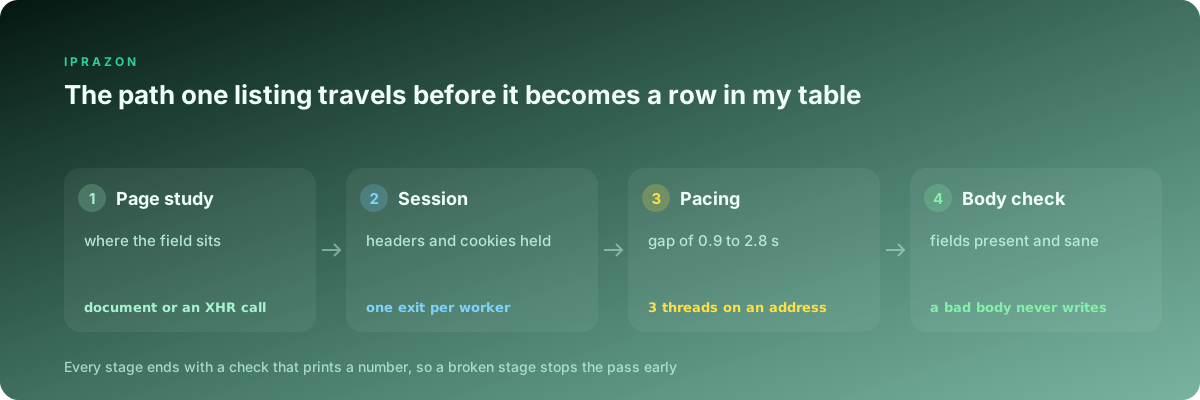
What follows is the same sequence I now use on every new target, stage by stage, with the code I actually run and the check I run after each stage. Every number here came off my own logs on that job and on a second target I collect from weekly. No stage gets skipped, because each one produces a figure the next stage depends on.
Reading the page before I write a line of code
Fifteen minutes with the browser open saves me a week of guessing. I load one listing, open the network panel, filter to documents and XHR, and reload with the cache disabled. Then I ask one question about every field the analyst wants: does it arrive inside the first HTML document, or does the browser fetch it separately afterwards.
The fastest way to settle that is a single fetch and a search through the bytes that came back.
import pathlib
import requests

URL = "https://target.example/listing/774812"

r = requests.get(URL, timeout=20)
pathlib.Path("sample.html").write_bytes(r.content)

for probe in ("Seller since", "774812", "region-code", "views_total"):
    print(probe.ljust(16), probe in r.text)
Four booleans, and the shape of the whole script is decided. On my classifieds target the title, the value, the seller name and the region all printed True, so one document fetch per listing covered four of the five fields. The views counter printed False, and the network panel showed it arriving from a small JSON endpoint at /api/v2/stats?id=. That endpoint returns under a kilobyte, so I call it directly and skip rendering entirely.
| Field the analyst asked for | Where it actually sits | What my worker requests |
|---|---|---|
| Title, seller, region | server HTML, inside a JSON-LD block | one document fetch |
| Listing value | server HTML, same JSON-LD block | one document fetch |
| Views counter | XHR call to a stats endpoint | direct JSON call, under 1 KB |
| Posted date | server HTML, written as relative text | document fetch, normalised locally |
| Phone number | XHR fired by a click, behind a limit | dropped from the brief |
That last row is worth the fifteen minutes on its own. The phone field would have doubled the request count and pushed every worker into a per-account allowance, and the analyst confirmed she had never used the column. One conversation removed half the difficulty of the project before any code existed.
The first request, and what came back in place of the page
A status code of 200 means the server answered. It carries no promise that the answer is the page you opened in your browser. My habit now is a probe function that prints five things and returns the response, so I can look at the object in a shell before writing anything that loops.
def probe(url, session=None, **kw):
    s = session or requests
    r = s.get(url, timeout=20, allow_redirects=True, **kw)
    print("status  ", r.status_code)
    print("final   ", r.url)
    print("bytes   ", len(r.content))
    print("type    ", r.headers.get("content-type"))
    print("history ", [h.status_code for h in r.history])
    return r
The final line has saved me more time than the rest put together. On the classifieds target my first probe reported 200 with 11 KB of content, and the final URL was /geo/choose?next=. The site had bounced me to a region picker and served it with a success code. A parser fed that page returns nothing and raises nothing, and rows of empty fields go quietly into the output while the log stays silent.
The byte count is the second signal. A real listing on that site weighs between 78 KB and 140 KB. Anything under 20 KB is an interstitial, a consent wall or a refusal page dressed as content. I wrote that floor into the script the same afternoon and it has flagged three separate incidents since.
Headers and a session that lasts longer than one page
A bare requests.get announces itself as a Python client, opens a fresh connection every time, and forgets every cookie the site hands it. All three of those are corrected by one object.
import requests

S = requests.Session()
S.headers.update({
    "User-Agent": ("Mozilla/5.0 (X11; Linux x86_64) AppleWebKit/537.36 "
                   "(KHTML, like Gecko) Chrome/125.0.0.0 Safari/537.36"),
    "Accept": "text/html,application/xhtml+xml;q=0.9,*/*;q=0.8",
    "Accept-Language": "en-GB,en;q=0.8",
    "Accept-Encoding": "gzip, deflate, br",
    "Sec-Fetch-Site": "same-origin",
    "Sec-Fetch-Mode": "navigate",
    "Upgrade-Insecure-Requests": "1",
})

def open_region(code):
    S.get(f"https://target.example/geo/set?code={code}", timeout=20)
    r = S.get(f"https://target.example/catalog/{code}", timeout=20)
    return r.status_code, len(S.cookies)
Two calls before the run starts, and the region cookie is set for every listing that follows. On my target open_region returns (200, 6), and if the cookie count comes back below 4 I stop the pass, because the listings that follow would carry values for the wrong warehouse.
I keep the header set small and internally consistent. A declared Chrome version paired with an Accept-Language nobody sends and a missing Sec-Fetch group reads as assembled by hand, and I have watched that combination collect refusals on a target where a shorter, honest set walked through. The Accept-Encoding line also earns its place directly: compressed bodies cut my transfer volume on this catalogue by a factor near four.
The session gives me connection reuse for free. Across a block of 200 listings the reused TCP connection removed the handshake from 199 of them, and the block time fell from 6 minutes 40 seconds to 4 minutes 05.
Pulling the fields out without the parser inventing them
Selectors tied to block classes break every time the front end team ships a template. On the classifieds site I found a structured block sitting in the page for search engines, and it has survived two visible redesigns while my CSS selectors would have died on both.
import json
from bs4 import BeautifulSoup

REQUIRED = ("title", "value", "seller", "region", "posted")

def fields(html):
    soup = BeautifulSoup(html, "lxml")
    blocks = []
    for tag in soup.select('script[type="application/ld+json"]'):
        try:
            blocks.append(json.loads(tag.string or "{}"))
        except json.JSONDecodeError:
            continue

    product = next((b for b in blocks if b.get("@type") == "Product"), None)
    if product is None:
        raise LookupError("no structured product block on this page")

    offer = product.get("offers", {})
    row = {
        "title": product.get("name"),
        "value": offer.get("price"),
        "seller": offer.get("seller", {}).get("name"),
        "region": offer.get("areaServed"),
        "posted": product.get("releaseDate"),
    }
    blank = [k for k in REQUIRED if not row.get(k)]
    if blank:
        raise LookupError("empty fields: " + ", ".join(blank))
    return row
The exception on an empty field matters more than the extraction above it. Before I added it, a template change dropped areaServed from the block for six days, and the analyst spent an afternoon reconciling a report where every listing claimed to come from one region.
My check for this stage runs offline. I keep 40 saved pages in a folder, covering listings with and without a seller badge, with and without a promotion label, and one that was deleted between saving and testing. Running fields over all 40 takes under a second and tells me the parser handles the awkward shapes before a single live request goes out. When the count of successful parses drops below 40, the parser gets fixed before any pass starts.
Spreading requests across a pool of addresses
One exit address collecting 6400 pages in an evening looks like one visitor reading a listing every two seconds for three hours. No shopper does that, and every counter on the far side is keyed to the source address.
I assign one address per worker for the length of a block, so cookies, the region choice and the TLS session all stay with a single exit. Picking a random address per request throws that away and produces a session that changes country between two clicks.
import itertools
import threading
import requests

POOL = [
    "socks5h://user:pass@node01.example.net:1080",
    "socks5h://user:pass@node02.example.net:1080",
    "socks5h://user:pass@node03.example.net:1080",
    # ... 12 entries in the working pass
]

_ring = itertools.cycle(POOL)
_lock = threading.Lock()

def take_node():
    with _lock:
        return next(_ring)

def worker_session(node):
    s = requests.Session()
    s.headers.update(S.headers)
    s.proxies = {"http": node, "https": node}
    r = s.get("https://ipinfo.io/json", timeout=15)
    print(node.split("@")[1], "->", r.json().get("ip"), r.json().get("country"))
    return s
The print line is the check. Twelve lines of output, twelve different addresses, twelve country codes matching the regions I collect from. Any node that returns my own collector address, or a country that does not match the brief, gets pulled out before the pass starts. The socks5h scheme keeps hostname resolution at the node, which keeps the region consistent with the exit.
Subnet spread is the part people discover late. My first pool had 8 addresses from one contiguous block, and when the target limited one of them it limited all 8 inside four minutes. I now take private addresses for scraping passes split across separate ranges, and a limit on one worker leaves the other eleven collecting. For the same reason I keep private addresses with no shared history on this project: an address that walked the same catalogue for somebody else last week arrives with its allowance already spent.
For the stats endpoint, where every call stands alone and no cookie needs to survive, rotation handled at the node does the spreading for me and my code holds one connection string. The listing pages themselves go through a SOCKS5 endpoint for Python clients, since requests speaks to it through a single scheme change and the same session object carries both plain calls and the occasional websocket the site opens on a category page.
Pacing: the gap between requests, and how I found mine
Threads and gaps are one setting expressed two ways. What the target counts is requests per address per minute, and everything else is arithmetic around that number.
I find the figure with a ramp against a small sample, watching for the first refusal.
import random
import time

def pause():
    time.sleep(random.uniform(0.9, 2.8))

def ramp(urls, session, gap_lo, gap_hi):
    seen = 0
    for url in urls:
        r = session.get(url, timeout=20)
        seen += 1
        if r.status_code in (403, 429):
            return seen, r.status_code
        time.sleep(random.uniform(gap_lo, gap_hi))
    return seen, 200
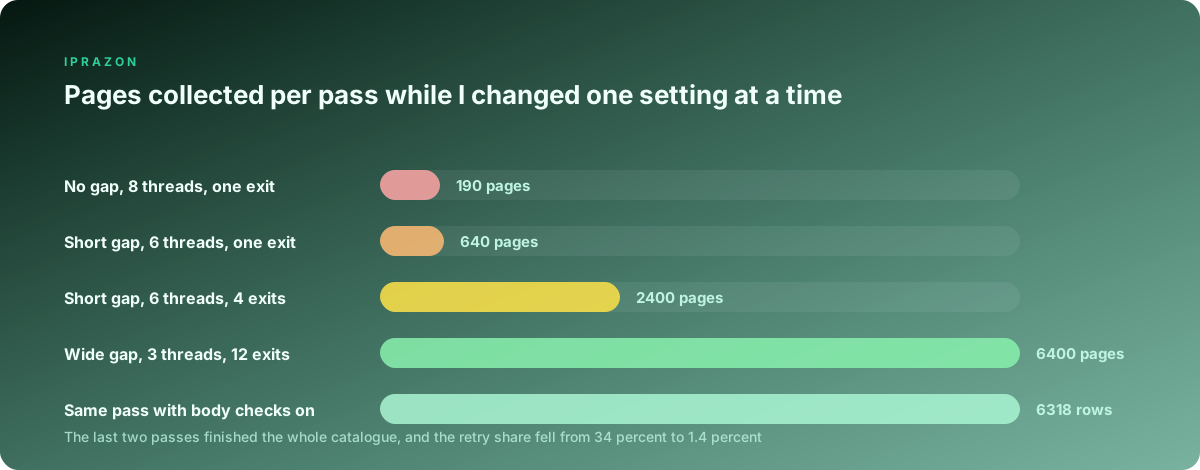
Four evenings of that ramp on the classifieds target produced the table I still work from.
| Gap between requests | Threads per address | Pages before the first refusal | Retry share over the pass |
|---|---|---|---|
| none | 8 | 190 | 34 percent |
| 0.3 to 0.7 s | 6 | 640 | 11 percent |
| 0.9 to 2.8 s | 3 | none in 6400 | 1.4 percent |
| 2.0 to 5.0 s | 2 | none in 6400 | 0.9 percent |
I settled on the third row. The fourth is calmer and costs 40 extra minutes of wall clock time for half a percentage point of retries, which the schedule does not need. The randomised window matters as much as its width: a fixed 1.5 second sleep produced refusals at 700 pages, while a random window over the same average carried the full catalogue.
One more habit from this stage. I spread the gap by category, so a category with 40 listings gets a wider window than one with 900, and the pass stops arriving as a burst of identical bursts.
When 403 arrives, and what I change in which order
A 403 on the first call and a 403 after 900 good pages are two different events, and treating them the same wasted a week for me once.
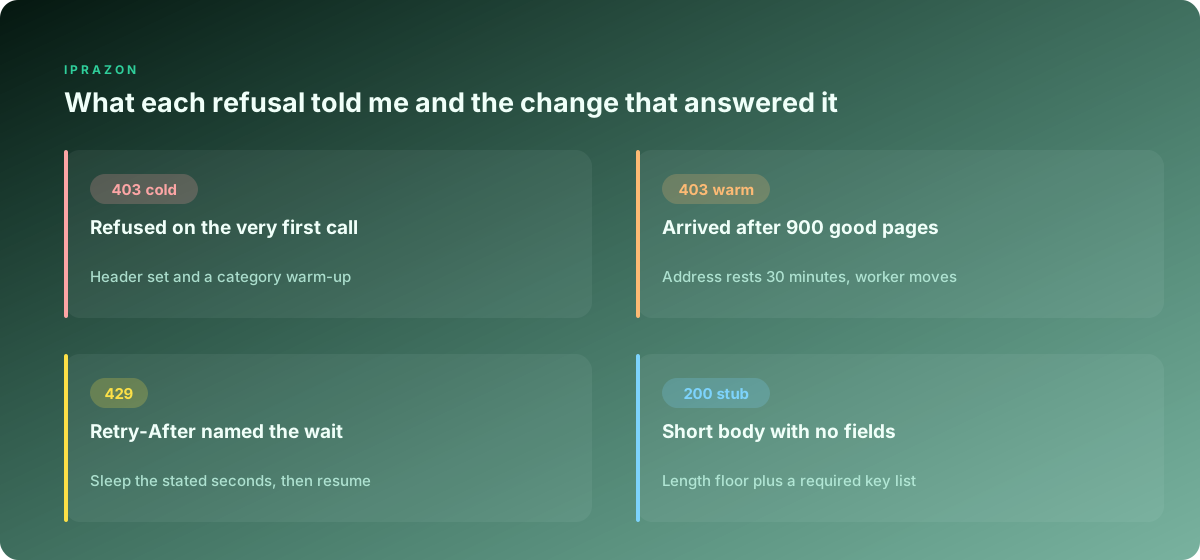
Cold 403, meaning the very first request is refused, points at the request itself. I run three checks in order. Does the same URL answer from the collector box with the browser header set and no address in the middle. Does it answer through the address with a browser copying the exact headers I send. Does the refusal body contain a challenge marker or a plain policy page.
import hashlib

SEEN = {}

def on_refusal(r, node):
    mark = hashlib.sha1(r.content[:4000]).hexdigest()[:10]
    SEEN.setdefault(mark, {"count": 0, "size": len(r.content), "nodes": set()})
    SEEN[mark]["count"] += 1
    SEEN[mark]["nodes"].add(node)
    return mark
Fingerprinting the first four kilobytes of every refusal groups them without me reading a single page by hand. On my worst evening the counter showed two marks: one appearing on 11 addresses at once, which was the site limiting my whole pass, and one appearing on a single address 46 times, which was that address carrying a history from before I bought it.
Warm 403, arriving after hundreds of good pages, means the address has spent its allowance. My answer is a rest period for that address. The worker parks it for 30 minutes, takes the next one from the ring, and the parked address returns to the pool afterwards without any manual step.
COOLDOWN = {}

def usable(node):
    return COOLDOWN.get(node, 0) < time.time()

def park(node, minutes=30):
    COOLDOWN[node] = time.time() + minutes * 60
Retrying a refused address immediately is the one move that reliably makes the state worse. Across my logs, an address parked for 30 minutes came back working on 94 percent of occasions. The same address hammered with three quick retries came back working on 41 percent, and several of those went silent for the rest of the evening.
429, and the wait the server already spelled out
Of all the status codes in this work, 429 is the polite one. It usually arrives with a Retry-After header, and that header contains the answer to the question everyone tries to guess with backoff maths.
The header comes in two shapes: a count of seconds, or an HTTP date. Both need handling, because a target that switches CDN vendors switches shape without telling anyone.
from datetime import datetime, timezone
from email.utils import parsedate_to_datetime

def retry_delay(r, attempt, cap=300):
    raw = r.headers.get("Retry-After")
    if raw:
        try:
            return min(int(raw), cap)
        except ValueError:
            try:
                when = parsedate_to_datetime(raw)
                gap = (when - datetime.now(timezone.utc)).total_seconds()
                return min(max(gap, 1), cap)
            except (TypeError, ValueError):
                pass
    return min(2 ** attempt + random.random(), cap)
The cap is there because I once trusted a header that asked for 3600 seconds and watched a worker sleep through the entire collection window. Anything above five minutes now means the address rests and the worker moves on, and the pass carries on with eleven exits while the twelfth waits.
Reading the header is also a measurement. On my classifieds target the values came back as 30, 60 and 120 seconds, climbing with each refusal inside one hour, which told me the limit was a sliding window per address. On the second target the header always said 5 and the refusals arrived in bursts, which pointed at a burst limit on concurrent connections. Two different limits, two different fixes: the first wanted a wider gap, the second wanted fewer threads on one address.
Checking the body before the row is allowed to be written
A pass that never sees a refusal can still fill a spreadsheet with plausible rubbish. This is the stage that separates a script that runs from a script that produces data.
I gate every response through three tests before the parser sees it, and every row through one more afterwards.
| Test | What it catches | What the worker does |
|---|---|---|
| Body under 20 KB | interstitials, consent walls, refusal pages | park the address, requeue the URL |
| Required marker absent | a stub or a generic catalogue page | requeue once, then log for review |
| Final URL host changed | a redirect off the listing entirely | drop the URL, flag the source list |
| Canary listing mismatch | wrong region served to this exit | stop the pass, alert me |
The canary is the one I recommend to everybody. I keep three listings whose title, region and value I checked by hand, and every worker fetches one of them at the start of its block and again every 400 pages. Any mismatch stops the pass immediately. That check has fired twice in eight months, and both times the site was serving a different region to a subset of my exits, which no status code would have revealed.
The rejected-row counter is the companion measure. My pass writes the count of rows refused by fields alongside the count written, and a refusal share above 3 percent halts everything and sends me a message. On the working pass I collect 6400 pages and write 6318 rows, and the 82 rejects are deleted listings that vanished between the queue being built and the worker arriving. That share is stable across passes, so any movement in it is a real signal.
Rows into a table anyone can open, and the pass that fills it
The analyst wants a spreadsheet, and a pass that only produces one at the very end has thrown away everything it collected when it stops at page 5900. My workers append to CSV as they go and the conversion happens afterwards.
import csv
import threading

_out = threading.Lock()
COLUMNS = ["listing_id", "title", "value", "seller", "region", "posted", "views"]

def write_row(row, path="rows.csv"):
    with _out:
        new = not pathlib.Path(path).exists()
        with open(path, "a", newline="", encoding="utf-8") as fh:
            w = csv.DictWriter(fh, fieldnames=COLUMNS)
            if new:
                w.writeheader()
            w.writerow(row)

def done_ids(path="rows.csv"):
    if not pathlib.Path(path).exists():
        return set()
    with open(path, encoding="utf-8") as fh:
        return {r["listing_id"] for r in csv.DictReader(fh)}
done_ids is what turns a script into something I can interrupt. The queue is filtered against it at startup, so a stopped pass resumes from where it left off and a crashed one loses at most the row in flight. When the site went down for maintenance mid-pass, I restarted an hour later and the workers picked up the remaining 2100 listings without a duplicate.
The conversion into a workbook is short and has exactly two traps in it.
import pandas as pd

df = pd.read_csv("rows.csv", dtype={"listing_id": str, "seller": str})
df["value"] = pd.to_numeric(df["value"], errors="coerce")
df["posted"] = pd.to_datetime(df["posted"], errors="coerce", utc=True).dt.date
df = df.drop_duplicates(subset="listing_id", keep="last")

with pd.ExcelWriter("catalogue.xlsx", engine="xlsxwriter") as book:
    df.to_excel(book, sheet_name="listings", index=False)
    sheet = book.sheets["listings"]
    sheet.freeze_panes(1, 0)
    sheet.set_column("A:A", 14)
    sheet.set_column("B:B", 56)
    sheet.autofilter(0, 0, len(df), len(COLUMNS) - 1)
The dtype argument is the first trap. Listing and seller identifiers on my target carry leading zeros, and without that line pandas reads them as integers and the analyst joins her tables on identifiers that no longer match anything. The second trap is the date column, where relative text like "posted yesterday" has to be normalised in the parser before it ever reaches this stage.
The freeze and autofilter calls take four lines and change how the file is received. A sheet that opens with a frozen header row and working filters gets used; a raw dump of 6318 rows gets a reply asking whether it can be sent in another format.
Put end to end, the working pass runs 12 addresses at 3 threads each, a gap between 0.9 and 2.8 seconds, a canary every 400 pages, a 30 minute rest on a warm 403, and the Retry-After value honoured up to five minutes. It collects 6400 listings in 71 minutes with a retry share of 1.4 percent and writes a workbook the analyst opens without asking me anything.
Looking back at the passes that failed, none of them failed because the code was wrong. They failed because a stage went unmeasured: I did not know where the field lived, I did not know the safe rate, I did not know that a 200 response can arrive with nothing in it. Each check in this piece costs a few lines and answers one of those questions permanently, and the answers carry over to the next target with only the numbers changing. The one part I set up before writing any collection code these days is the exits, since a pool sized for a collection pass across separate ranges removes the failure that no amount of Python repairs, and long overnight passes sit on a datacenter pool that holds its rate so the gap I measured on Monday still holds on Friday.
Related material from this series: proxy speed test and how many addresses a pool actually needs.