IP leak test, channel by channel: what actually exposes the origin address through DNS, WebRTC, headers and timing
For three weeks a collector of mine pulled regional listings for the city my own machine sits in. The exit was rented and pinned, and every detection page I opened reported it in the country I had asked for. The shop disagreed, quietly, by serving content built for somewhere else entirely.
The cause had nothing to do with the address the far side saw. That shop's front end read the time zone out of the browser and assembled its regional block from that one reading. My rented exit was doing its job perfectly. My browser profile was answering a separate question, and answering it honestly, about the machine on my desk.
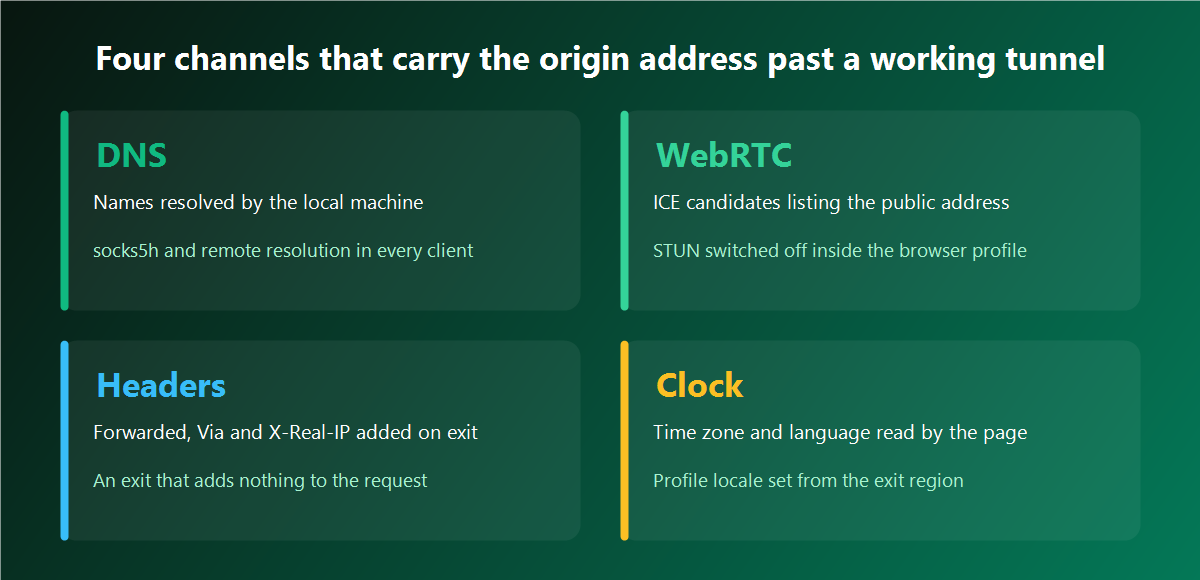
So I sat down and mapped every route by which the origin address, or something that points straight back at it, can reach a page while a tunnel is up and carrying traffic. Six routes came out of that audit. Each one has a probe I can run in under two minutes, a reading that says whether the channel is open, and a fix that closes it for good. This piece walks all six in the order I run them, with the commands as I actually type them.
The bench every probe runs on
The setup stays identical across all six checks, which is what makes the readings comparable. One machine on my desk, one rented address, one browser profile, and two instruments.
The first instrument is packet capture on my own interface. A page can misreport what it received. My network card cannot misreport what it sent, so capture settles arguments that no online checker can.
sudo tcpdump -ni any 'udp port 53 or tcp port 53' -l | tee dns.logThe second instrument is a small endpoint of my own that echoes back every header it was handed. Public detection pages display a curated list, usually five or six well known fields. Mine shows everything, including the field a badly configured exit invents and no checker bothers to print.
<?php
header('Content-Type: application/json');
$h = [];
foreach ($_SERVER as $k => $v) {
    if (strpos($k, 'HTTP_') === 0) { $h[$k] = $v; }
}
$h['REMOTE_ADDR'] = $_SERVER['REMOTE_ADDR'];
echo json_encode($h, JSON_PRETTY_PRINT);
Everything else is curl, a browser console and a clock. The address under test never changes during a session, and it is an address issued to one buyer alone, so nothing in my readings arrives from a neighbour's traffic on the same exit.
One more habit worth copying. I write the six readings into a plain text file with the date and the address, one file per rental. When a job starts behaving oddly two months later, that file tells me whether the setup was ever verified or whether I assumed it.
Channel one: names resolved by my own machine
This is the widest channel and the quietest. A client speaking SOCKS5 has two ways to handle a host name. It can resolve the name locally and hand the resulting address to the exit, or hand the name over and let the exit do the lookup. Both connect. Both return the page. Only the second keeps the question inside the tunnel.
In curl the whole difference sits in one letter.
sudo tcpdump -ni any 'port 53' -c 20 &
curl -s -x socks5://user:pass@ADDR:PORT  https://target.example/ -o /dev/null
curl -s -x socks5h://user:pass@ADDR:PORT https://target.example/ -o /dev/null
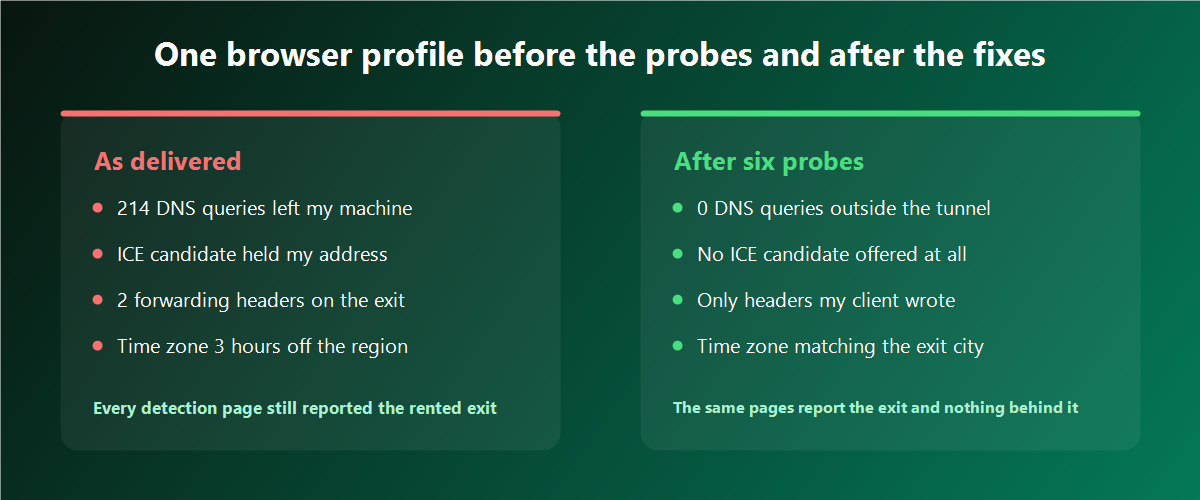
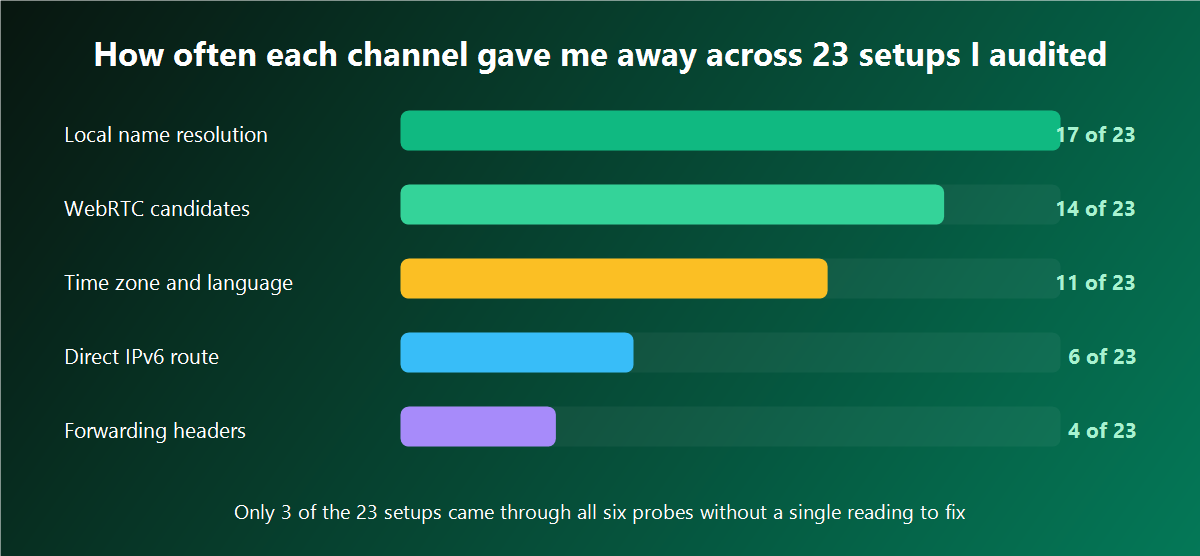
The first line produced 4 packets on port 53 leaving my interface. The second produced none. Over a full collector run of 300 pages I counted 214 lookups going out from my own machine, each one carrying the host name of a shop I was collecting from, each one visible to whoever operates the resolver my machine was pointed at.
What the far side does with that is the part people underestimate. A leak checker serves every visitor a batch of unique host names under a domain whose authoritative name server it controls. When my machine resolves those names, the operator of that name server sees which resolver asked. A resolver sitting one hop from my desk gives away my region, my network operator, and often enough my city. The page I was visiting never saw my address, and it did not need to.
The fix is per client, and the list is short enough to work through in ten minutes.
| Client | The setting that keeps lookups inside the tunnel |
|---|---|
| curl | socks5h:// in the proxy string, never socks5:// |
| Python requests | socks5h:// in both the http and https keys |
| Firefox | network.proxy.socks_remote_dns set to true |
| Chromium family | SOCKS5 through the command line flag, host resolution follows |
| A parser with a proxy field | look for the remote resolution checkbox and tick it |
proxies = {"http":  "socks5h://user:pass@ADDR:PORT",
           "https": "socks5h://user:pass@ADDR:PORT"}
This channel is the reason I keep SOCKS5 access that resolves names on the exit side on every address I rent, even for jobs that speak plain HTTP most of the time. The moment a job grows a component that opens raw sockets, the SOCKS path is already there and already configured.
Verification is the same capture run again. I start tcpdump, run 50 real pages through the job, and stop. Zero packets on port 53 means the channel is shut. Anything above zero means one client in the chain still resolves locally, and the capture log names the host it asked about, which points straight at the guilty component.
Channel two: WebRTC and the candidates the browser offers
A browser that supports peer connections will, when asked, gather a list of ways it can be reached. That list includes host candidates holding the machine's local address and, when a STUN server answers, a server reflexive candidate holding the public address the STUN server saw. The second kind is what ends the anonymity of an otherwise correct setup.
The probe fits in a console paste and takes about five seconds to answer.
const pc = new RTCPeerConnection({
  iceServers: [{ urls: 'stun:stun.l.google.com:19302' }]
});
pc.onicecandidate = e => { if (e.candidate) console.log(e.candidate.candidate); };
pc.createDataChannel('probe');
pc.createOffer().then(o => pc.setLocalDescription(o));
Every line printed is a candidate. Lines containing typ host hold local addresses, which matter less on their own. Lines containing typ srflx hold the public address, and if that address is the one my home connection carries, the channel is wide open. Across 23 setups I have audited for myself and for two colleagues, 14 printed an srflx candidate holding the machine's own public address while the rented exit was active and reporting correctly on every detection page.
Three fixes work, and I use different ones on different benches.
In Firefox, media.peerconnection.enabled set to false removes the capability altogether. Nothing gathers, nothing prints, and I have yet to meet a collection job that missed it.
In the Chromium family, the policy WebRtcIPHandlingPolicy set to disable_non_proxied_udp keeps candidate gathering inside the proxied path. Sites that genuinely use peer connections keep working, and the reflexive candidate stops carrying my address.
In a profile managed by an antidetect browser that holds the network settings per profile, the WebRTC field usually offers three modes: off, forwarded through the proxy, or set to a specific address. I run forwarded on profiles that need to look ordinary, and off on collection profiles where no page has any reason to open a peer connection.
Verification is the same console paste. A closed channel prints either nothing at all or candidates whose srflx line carries the rented address. Both readings pass. Anything printing my own address fails, and I stop the profile before it touches a target.
Channel three: what the exit writes into the request headers
The tunnel itself can announce the tunnel. Some exits append fields describing where the request came from, some append fields describing the software doing the forwarding, and a few append both. My echo endpoint shows all of it in one call.
curl -s -x http://user:pass@ADDR:PORT https://echo.mydomain.example/h \
  | python3 -m json.tool
Across 9 candidate exits I put through this test over one stretch of work, 2 returned a forwarded field holding my own address, and 1 added a Via field naming the forwarding software together with its version number. The remaining 6 returned exactly the fields my curl command had written and nothing else.
| Field | What it carries | How the far side reads it |
|---|---|---|
| X-Forwarded-For | the address that opened the connection to the exit | the origin address in full, no guesswork needed |
| X-Real-IP | the same value under a different name | identical exposure, often missed by checkers |
| Forwarded | a structured record with for= and proto= | the origin address plus the path it travelled |
| Via | the forwarding software and version | a tunnel is in use, and its software is known |
| X-Proxy-ID | an identifier assigned by the forwarding host | requests group together across sessions |
The last row deserves a sentence of its own. An identifier that stays constant across my sessions links every request I make through that exit into one group, even when the group holds several profiles that should have nothing to do with each other. Nobody has to learn my address for that grouping to hurt.
What I want from an exit here is simple to state and easy to verify: the request that arrives at the target should be byte for byte the request my client built. That property comes from an exit that adds nothing of its own to a request, and it takes one curl call to confirm on delivery day. I run that call before any profile or job touches a new address, every time, and it has saved me from two exits that would have quietly undone the entire setup.
Verification also has a second half that people skip. Header behaviour can differ between plain HTTP and HTTPS, and between the direct method and the CONNECT method. I run the echo call four ways: over HTTP, over HTTPS, through the HTTP proxy port and through the SOCKS5 port. Four identical outputs mean the exit behaves consistently. One odd output out of four is worth an email to support before anything else happens.
Channel four: requests the page fires past the tunnel
A configured proxy covers the traffic that agrees to go through it. Several kinds of traffic never agree, and each kind has its own reason.
The largest of them is the second address family. When my machine holds a working route over IPv6 and the tunnel carries IPv4 only, any target publishing an AAAA record gets contacted directly from my own interface. The browser makes that choice on its own, it makes it fast, and no error appears anywhere.
curl -s -6 https://v6.echo.mydomain.example/ip
ip -6 route get 2606:4700:4700::1111
If the first line returns an address, that route works and the leak is live. On one of my benches a single page load made 148 requests, and 11 of them left over IPv6 straight from my interface while the other 137 went through the rented exit. The site had my address in full, alongside a complete list of which parts of its own page I had loaded.
The second kind is the bypass list. Every proxy dialog carries a field for addresses that skip the tunnel, and the defaults in that field are wider than most people expect. A local hostname pattern in there will let a target that resolves to a matching name go direct. I empty that field on working profiles and keep only the loopback entry.
The third kind is software that keeps its own settings: updaters, extensions that call home, and any tool with a config file of its own. These fire on their own schedule, and they fire whether or not my job is running.
The way I close all three at once is a firewall rule tied to the user account the work runs under. The job gets its own system user, and that user may reach exactly one address.
sudo useradd -m collect
sudo iptables  -A OUTPUT -m owner --uid-owner collect ! -d 203.0.113.10 -j REJECT
sudo ip6tables -A OUTPUT -m owner --uid-owner collect -j REJECT
The rule needs a fixed target to allow, which is why the whole approach works on server addresses that stay on the same hardware for the length of the rental. I write the address into the rule once, and the rule then guarantees the property that no browser setting can guarantee on its own: if the tunnel goes down, the job stops, silently and completely, with no direct connection taking its place.
Verification runs in the browser itself. In the network panel I switch on the Remote Address column, load the target, then sort by that column. Every row should show the rented address. A row showing anything else names the exact request that escaped, and the initiator column names the code that fired it.
Channel five: time zone and language reported by the profile
This is the channel that cost me three weeks on the shop I opened with, and it never touches the network at all. The browser hands over its locale settings to any script that asks, and a page comparing those settings against the address it sees has a very cheap consistency test.
console.log(
  Intl.DateTimeFormat().resolvedOptions().timeZone,
  new Date().getTimezoneOffset(),
  navigator.language,
  navigator.languages.join(',')
);
Four values come back. On the profile that had been feeding me the wrong regional listings, the time zone named my own city, the offset matched it, and the language list started with my home locale while the exit reported a country three hours west. Of the 23 setups in my audit, 11 showed a mismatch of this kind, which makes it the second most common opening after name resolution.
The header side matters too, because a server can run the same test without any script at all. The Accept-Language field travels with every request my browser makes, and my echo endpoint prints it alongside the rest.
curl -s -x http://user:pass@ADDR:PORT \
  -H 'Accept-Language: pt-PT,pt;q=0.9,en;q=0.8' \
  https://echo.mydomain.example/h | grep -i accept_language
The fix has three parts and takes about four minutes per profile. The profile time zone gets set from the exit region, the language list gets reordered so the exit region's language leads, and headless runs get the same setting through the environment.
TZ=Europe/Lisbon node collect.jsFor long lived profiles I take a private IPv4 address pinned to that one profile and write its region into the profile settings on the day the profile is created. The pairing then stays fixed for the life of the account, which removes the whole class of drift where an address changes and the locale settings quietly keep pointing at the old region.
Channel six: round trip arithmetic and the clock
The last channel gives nothing away directly. It gives away that the claimed position is wrong, which is enough for a platform to treat everything else with suspicion.
Round trip time obeys geography. I keep three anchor hosts whose positions I know, and I measure the connect time to each one through the exit under test. The pattern that comes back either matches the claimed city or contradicts it.
for h in anchor-near.example anchor-mid.example anchor-far.example; do
  printf '%-24s ' "$h"
  curl -s -o /dev/null -w '%{time_connect}\n' \
    -x http://user:pass@ADDR:PORT "https://$h/"
done| Anchor host | Distance from the claimed city | Connect time through the exit | My reading |
|---|---|---|---|
| anchor-near | inside the same city | 6 milliseconds | consistent with the claim |
| anchor-mid | about 900 kilometres away | 24 milliseconds | consistent with the claim |
| anchor-far | about 4200 kilometres away | 71 milliseconds | consistent with the claim |
| candidate exit, near anchor | inside the claimed city | 88 milliseconds | the exit sits far from its claim |
That last row is a real candidate I turned down. Its record said one city, three detection pages agreed with the record, and the wire said the packets were travelling roughly the distance of a continent to get there. A platform running the same arithmetic reaches the same conclusion in one request.
The clock is the second reading in this channel. A browser reports its own time, a server reports its own time, and the gap between them stays constant across sessions on the same machine.
date -u
curl -sI -x http://user:pass@ADDR:PORT https://echo.mydomain.example/h \
  | grep -i '^date:'
A gap under a second tells me nothing and is fine. One profile of mine ran 41 seconds fast for a month, which is a stable marker riding along with every request it made, and it took one timedatectl command to remove.
The third reading is the schedule. Requests that cluster between 09:00 and 19:00 in my own time zone describe my working day, whatever region the exit claims. Where a profile has to look local, I move its jobs into the working hours of the exit region and spread the start times across a 40 minute window.
Six channels in one table
Here is the whole audit on one screen. I keep this open while working through a new rental, and I write the reading for each row into the rental's text file as I go.
| Channel | The probe I run | What an open channel looks like | What closes it |
|---|---|---|---|
| Name resolution | tcpdump on port 53 during a 50 page run | any packet on port 53 leaving my interface | socks5h in every client, remote resolution ticked |
| WebRTC | the console paste, five seconds of gathering | an srflx candidate holding my own address | peer connections off, or handling policy set to proxied only |
| Request headers | one curl call to my echo endpoint | a forwarded, real-ip or via field in the output | an exit that writes nothing of its own |
| Traffic past the tunnel | the remote address column, plus a curl -6 check | any row with an address other than the exit | one system user per job and a firewall rule tied to it |
| Locale | four values from the console, plus accept-language | a time zone or language pointing at my region | profile settings written from the exit region |
| Timing | three anchor hosts, plus the date header gap | connect times contradicting the claimed city | an exit whose measured position matches its record |
Two things about this table changed how I work. The first is that four of the six rows have nothing to do with the seller of the address and everything to do with my own configuration. The second is that the two rows that do involve the seller, headers and timing, are settled by a single curl call each, on the day the address arrives, before a job touches it.
Running the whole set as one script
After the third rental I stopped typing the probes one at a time. The network side of the audit now runs as one script that takes about 90 seconds and writes a report I can attach to the rental file. The browser side stays manual, since the console paste needs a real profile open.
#!/usr/bin/env bash
set -u
PX="$1"                       # user:pass@ADDR:PORT
OUT="audit-$(date +%s).txt"

exec > >(tee "$OUT") 2>&1
echo "== exit as the far side sees it"
curl -s -x "http://$PX" https://echo.mydomain.example/h | python3 -m json.tool

echo "== forwarding fields"
curl -s -x "http://$PX" https://echo.mydomain.example/h \
  | grep -Ei 'forwarded|via|real_ip|proxy' || echo "none present"

echo "== second address family"
curl -s -6 --max-time 5 https://v6.echo.mydomain.example/ip || echo "no direct route"

echo "== name resolution"
sudo timeout 12 tcpdump -ni any 'port 53' -c 30 -w /tmp/dns.pcap &
curl -s -x "socks5h://$PX" https://target.example/ -o /dev/null
wait
echo "packets captured: $(tcpdump -r /tmp/dns.pcap 2>/dev/null | wc -l)"

echo "== anchors"
for h in anchor-near.example anchor-mid.example anchor-far.example; do
  printf '%-24s ' "$h"
  curl -s -o /dev/null -w '%{time_connect}\n' -x "http://$PX" "https://$h/"
done

echo "== clock gap"
date -u
curl -sI -x "http://$PX" https://echo.mydomain.example/h | grep -i '^date:'
The report lands next to the rental notes, and the next audit compares against it line by line. Twice now that comparison caught a change I had not been told about: an exit that started adding a Via field after a maintenance window, and an anchor pattern that shifted by 30 milliseconds overnight, which turned out to be a route change on the operator's side.
What a passing setup looks like on my desk
The numbers from my current bench, taken after the six fixes went in, read like this. Zero packets on port 53 across a 300 page collector run. No ICE candidate printed at all on collection profiles, and a candidate holding the rented address on the two profiles that keep peer connections available. Six header fields at the echo endpoint, all six written by my own client. Every row in the network panel showing the rented address, across 148 requests on the heaviest page I collect from. A time zone and a language list matching the exit country. Anchor times of 6, 24 and 71 milliseconds against the three reference hosts, and a clock gap of 0.4 seconds.
Getting there took one evening for the configuration and about 90 seconds per address after that. The evening was mostly Firefox preferences and one firewall rule I now copy between machines.
The part I would tell anyone starting this audit today: run the probes before the work, on the day the address arrives. Every one of the six readings is cheap while nothing depends on it, and each one becomes an archaeology project once a profile has been running for a month and started collecting checks. My routine now is the script, the console paste, and four minutes of profile settings, all done while addresses set up for anonymous work sit idle and waiting in the rental panel. Work starts after the six lines in the file all read as expected, and it has been a long time since a shop guessed my city from anything.
Two neighbouring pieces cover ground I moved through quickly here: testing a proxy before you rely on it works through the measurement suite that runs before any of these probes, and shadow restrictions and account reach shows what happens on the account side when one of these channels stays open for a few weeks.