Why is my proxy server not working: the checks in the order that saves time
Four messages a week reach me with the same sentence: the proxy stopped working. The sender means one of five unrelated things, and those five share nothing except the symptom. I keep 60 private addresses across three projects and a collector that touches all of them through the night, so I have walked every branch of this tree more times than I care to count.
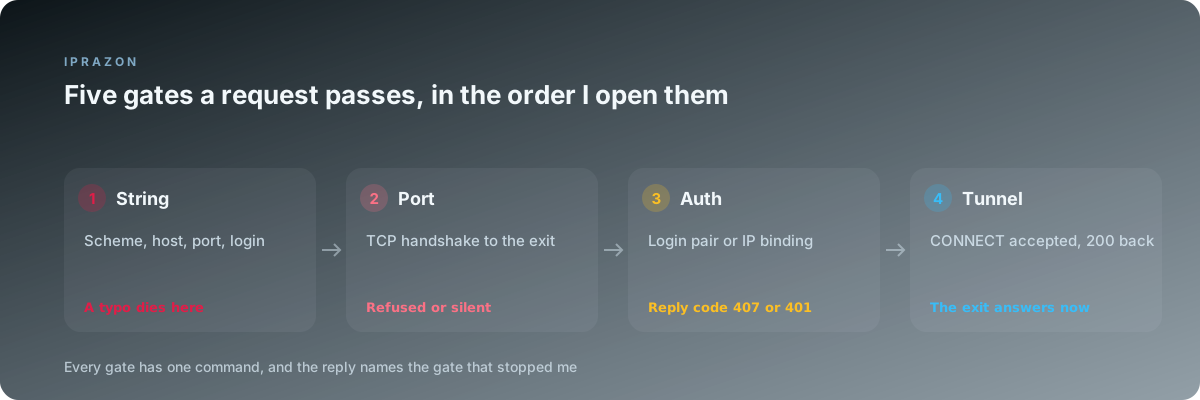
The order of the checks decides how long the answer takes. Someone who opens the target site first will spend 40 minutes reading anti-bot articles while a stray colon sits in a connection string on their own machine. Walking outward from the string to the site, one gate at a time, pulled my average time to an answer from roughly 25 minutes down to 6.
What follows is that walk. Every section is a node: one question, one command, and a reading of each reply that tells me which node comes next. The figures come from a log of 214 tickets I have handled for myself and for two colleagues.
Node one: read the string before you run anything
A connection string carries five parts: scheme, login, password, host, port. My log says 24 percent of all reports die right here, and every one of those tickets cost the reporter at least half an hour before they wrote to me.
Print the string with control characters visible. A password copied from a web panel drags a carriage return along with it often enough that I check this first on any Windows machine.
printf '%s' "$PROXY" | cat -A
  # http://u91442:s3cr3t@203.0.113.10:8085$        <- good
  # http://u91442:s3cr3t@203.0.113.10:8085^M$      <- carriage return at the end
Three replies are possible here. A trailing ^M or a stray space means the string is broken, and nothing further down the tree matters until it is fixed. A password holding @, : or / means the parser splits the string in the wrong place, so those characters go through percent encoding before the string is used. A string that prints exactly as it was issued sends me to node two.
One detail catches people who work from a panel and a config file at once. The panel shows the port for HTTP access, the config file may hold the port for SOCKS5 access, and both ports belong to the same host. My own list keeps one line per address with both ports written out, because reading them from memory is where my worst hour went.
Node two: if the client rejects the scheme, the protocol line is the branch
The scheme tells the client which conversation to start. http:// opens an HTTP proxy conversation, socks5:// opens a SOCKS handshake, and socks5h:// opens the same handshake with name lookup handed to the far end. A client that speaks one of these to a port expecting another produces a message that names the confusion.
curl -sS -v -x "socks5://u91442:s3cr3t@203.0.113.10:8085" https://ifconfig.me 2>&1 | head -6
  # curl: (97) SOCKS5: server does not respond, or wrong version
That reply is worth reading twice. The port answered, the handshake started, and the far end had no idea what the first byte meant. My address list carries both protocols on one host, so the fix is a port swap in the string. I take SOCKS5 access on the same address list exactly for this reason: one address serves a browser through HTTP and a Python client through SOCKS5, and the two never fight over a port.
A different message appears when the scheme itself is unknown to the tool. Unsupported proxy syntax from curl and Missing scheme from a Python client both mean the string lost its prefix somewhere, usually when a tool wrote it back into a config file without the protocol. When the scheme, the port and the tool agree, the next gate is the port itself.
Node three: if nothing answers, test the port with no proxy logic at all
Everything up to this point was text. This check is the first one that touches the network, and it deliberately drops all proxy semantics so a single fact comes back: does a TCP connection open.
nc -vz 203.0.113.10 8085          # Linux and macOS
Test-NetConnection 203.0.113.10 -Port 8085   # Windows PowerShell
Three outcomes, three different branches, and telling them apart saves the most time of any check in this article.
| What comes back | What it means | Where I go next |
|---|---|---|
| succeeded, open | The exit is alive and listening | Node four, authorisation |
| Connection refused | The host answered and closed the port | Wrong port, or the service is down |
| timed out, filtered | Nothing answered at all | My own outbound rules, then the host |
| No route to host | The path stops before the exit | Local network or a VPN client on my machine |
The gap between refused and timed out is the one worth memorising. A refusal is an answer: something at that address processed my packet and declined it, so the host lives and my traffic reaches it. A timeout is silence, and silence usually starts on my side of the wire, in a corporate firewall that permits 80 and 443 while dropping everything else outbound.
I test that theory in one line. When the same port opens from a phone tethered on its own connection and stays silent from the office desk, the office is the node with the problem, and the address is fine.
Node four: if the port opens, read the authorisation reply exactly
An open port with no data flowing means the exit wants to know who I am. Two mechanisms are in use across the industry, and the reply names which one applies.
curl -sS -v -x "http://u91442:s3cr3t@203.0.113.10:8085" https://example.com -o /dev/null 2>&1 \
  | grep -Ei 'proxy|407|401|connect'
  # < HTTP/1.1 407 Proxy Authentication Required
  # < Proxy-Authenticate: Basic realm="proxy"
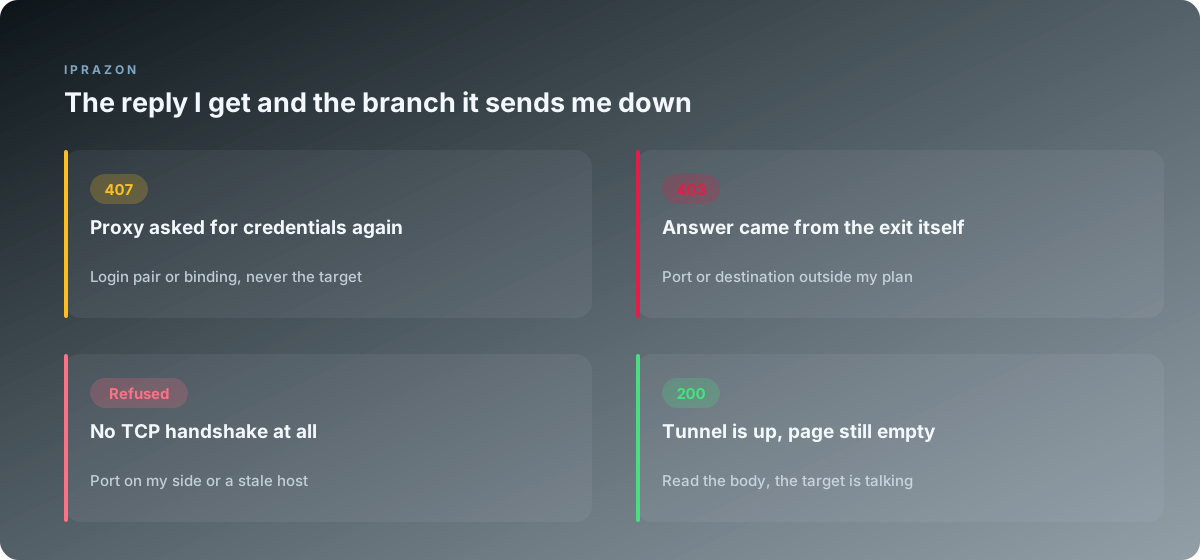
A 407 is the proxy speaking about itself. A 401 in the same position comes from the target site and belongs to a later node, so the two digits decide which direction I look. My log gives 38 percent of all tickets to this node, which makes it the single largest source of failures I record.
| Reply at this gate | Cause behind it | The move that clears it |
|---|---|---|
| 407 with a login pair supplied | Password wrong, encoded wrong, or expired | Reissue the pair in the panel, re-encode the string |
| 407 with no login pair supplied | The address expects a login pair | Add the pair, or switch the address to binding |
| Connection closes with no reply | The address is bound to another machine | Add my current address to the binding list |
| 403 straight from the proxy | Port or destination sits outside the plan | Ask for the port range on the address |
Address binding deserves its own paragraph, because it produced my longest outage. The exit accepts traffic only from machines whose address appears on its list, which works perfectly until the machine's address changes. My office link renews its address every 14 days at around three in the morning, and the collector went dark at 03:12 with no error beyond a closed connection. Nothing had changed on the exit, nothing had changed in the config, and the whole failure lived in one line of a binding list.
Since then my binding list carries the office range and the server that runs the collector, and I re-check both on the first of every month. When work moves between machines often, a login pair travels better, because it follows the config file to whatever host runs it next.
Node five: if authorisation passes, watch the tunnel actually open
For an HTTPS target through an HTTP proxy, the client asks for a tunnel with CONNECT, and the exit answers before any encryption starts. That answer is the cleanest signal in the whole tree, so I read it directly.
curl -sS -v -x "http://u91442:s3cr3t@203.0.113.10:8085" https://api.example.net/v1/status 2>&1 \
  | grep -E 'CONNECT|established|HTTP/'
  # > CONNECT api.example.net:443 HTTP/1.1
  # < HTTP/1.1 200 Connection established
  # < HTTP/2 200
Two codes appear in that output and they belong to different parties. The first 200 comes from the exit and says the tunnel is open. The second comes from the site at the other end of that tunnel. Once I learned to separate those two lines, half the confusion in my inbox stopped, because a message saying "I get 403" almost never says which of the two parties sent it.
A CONNECT that returns 403 with a Proxy-Agent header is the exit refusing a destination port. Many pools open 80 and 443 only, so a mail port or a game port gets declined at this gate while web traffic runs perfectly. That behaviour is a plan boundary, and the panel usually lists the open range on the address page.
A CONNECT that hangs with no reply at all points back at node three, since a tunnel request needs a working TCP session underneath it. When the exit answers 200 and the page still arrives empty, the branch leads to node six or node seven, and the difference between them is where the name gets resolved.
Node six: if the tunnel opens and names fail, move the lookup to the exit
This node produced 13 percent of my tickets and every one of them looked like a dead exit at first glance. The tunnel works, the exit responds, and the request still ends in a name error or, worse, quietly reaches the target from my own machine.
curl -sS -x "socks5://u91442:s3cr3t@203.0.113.10:8085"  https://ifconfig.me
curl -sS -x "socks5h://u91442:s3cr3t@203.0.113.10:8085" https://ifconfig.me
Those two lines differ by one letter and behave very differently. With socks5, my machine resolves the hostname and sends the exit an address, so my own resolver sees every domain I visit. With socks5h, the name travels to the exit and the lookup happens there, which is what I want on every job that carries an identity.
The same split exists in Python. socks5:// in a proxies dictionary resolves locally, socks5h:// resolves remotely, and the two produce identical output on a working setup, which is why the difference stays invisible until a resolver breaks or a leak test reports my provider's name.
import requests
loc = {"https": "socks5://u91442:s3cr3t@203.0.113.10:8085"}
rem = {"https": "socks5h://u91442:s3cr3t@203.0.113.10:8085"}
for tag, p in (("local", loc), ("remote", rem)):
    print(tag, requests.get("https://ifconfig.me", proxies=p, timeout=15).text)
Both lines printing the exit address means the tunnel carries traffic properly in either mode. A name error on the first line with a working second line means my local resolver is the failing part, and the exit was never involved. I keep the remote form in every config now, and my leak checks have come back matching the exit on all 60 addresses since.
Node seven: if every gate passed, the branch leaves my equipment
At this node the string parses, the port opens, authorisation passes, the tunnel reports 200 and names resolve at the exit. The request reaches the target and comes back with something I did not want. Everything from here belongs to the site, and the fix lives in how I present myself.
The separation test takes 20 seconds and I run it before I even look at the site's behaviour.
for host in https://ifconfig.me https://example.com https://the-target.example; do
  echo -n "$host  "
  curl -sS -o /dev/null -w '%{http_code} %{time_total}s\n' \
    -x "http://u91442:s3cr3t@203.0.113.10:8085" "$host"
done
Three lines come back. When the first two return 200 and the third returns 403 or 429, the tunnel is healthy and the target has made a decision about my visit. When all three fail, the fault is upstream of the target and I walk back to node three.
What the target decided on shows up in the reply body far more often than people expect. A challenge page, a rate notice and a geographic block all arrive as text under the same status code, so I read the first 400 characters of the body before touching any setting. Header order, TLS fingerprint, cookie state and request pace all live in this node, and each has its own repair.
One property helps at this gate more than any tuning I have tried. When the exit passes nothing of its own, the site judges my request on my request alone, so I use an exit that adds no headers of its own and confirm it by reading every header the far side receives. An exit that quietly attaches a forwarded header turns this node into an unsolvable puzzle, since the site sees two addresses and trusts the one it recognises.
Node eight: if it worked yesterday and fails today, four things change
A working setup that stops overnight has a much shorter tree, because the string has not edited itself. Four causes cover almost everything I have logged in this shape.
The binding list is the first suspect, and my numbers put it far ahead of the rest. Any address change on my side, whether from a router renewal, a laptop moving to another network, or a new server in the group, breaks a binding that nobody edited.
The rental term is the second. An address that reaches the end of its paid period stops answering with the same silence a firewall produces, and the panel is the only place that says so plainly. I set a calendar reminder 3 days ahead for every address group after losing a night run to this exact case.
An outbound rule on my own network is third, and it changes without asking me. A security update to the office gateway closed everything above 1024 outbound on a Tuesday morning, and my desk saw timeouts on every SOCKS5 port while HTTP on 8085 kept working perfectly.
The target site itself is fourth. Sites tighten their rules, and yesterday's pace becomes today's 429. Reading the code and the body separates this case from the other three in under a minute, and the neighbouring piece on reply codes goes through each of them.
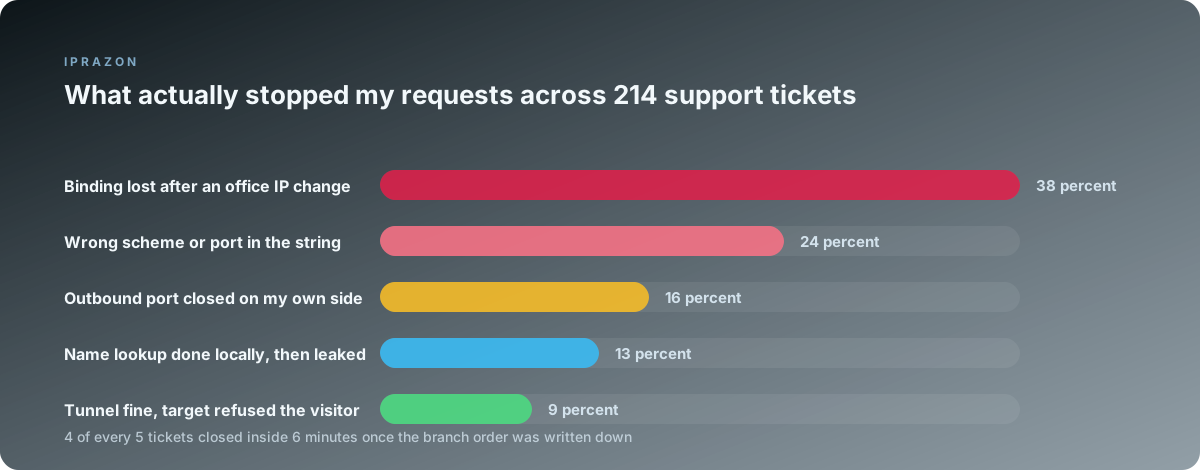
The chart shows why I open the binding list before I open anything else on a setup that used to work. Two questions answer most of these tickets: what changed on my side, and when exactly did the last successful request land. My collector writes both facts into its log, so the answer takes one grep.
The branch map on a single page
This is the table I keep pinned next to my monitor. Reading down the first column and stopping at the row that matches the symptom has replaced most of my guessing.
| Symptom I see | Command that identifies it | Reply that confirms it | Branch to take | |
|---|---|---|---|---|
| Tool refuses to start | `printf '%s' "$PROXY" \ | cat -A` | trailing ^M or a space | Rewrite the string, encode specials |
| Wrong version, no response | curl -v -x socks5://... | SOCKS5 version mismatch | Swap protocol or port on the host | |
| Nothing at all happens | nc -vz host port | timed out | Outbound rules on my own network | |
| Instant rejection | nc -vz host port | connection refused | Wrong port, or the service is down | |
| Endless authorisation prompt | `curl -v ... \ | grep 407` | 407 Proxy Authentication Required | Login pair, or my address in the binding list |
| Tunnel refuses one port | `curl -v ... \ | grep CONNECT` | 403 with a proxy header | Ask which ports the plan opens |
| Name errors only | socks5 against socks5h | one works, one fails | Move name lookup to the exit | |
| Two sites fine, one blocked | three-host loop above | 200, 200, 403 | The target decided, read the body | |
| Worked yesterday, dead today | panel plus binding list | address changed at my end | Update binding, check the rental term |
Two rows carry most of my traffic. The 407 row and the "worked yesterday" row together cover 38 percent of the log, and both trace back to a binding list that stopped matching reality. That is the reason I keep a private address issued to one buyer with its binding list under my own control: the list holds what I put in it, and no other tenant edits it while I sleep.
What I write in the log so a branch is never walked twice
Every ticket ends with four lines in a text file, and those four lines have saved me more hours than any tool I have installed.
The first line records the symptom in the reporter's own words. The second records the node where the walk stopped. The third records the command that identified it and the exact reply. The fourth records what changed to fix it, including the case where the answer was a message to support.
That file now holds 214 entries, and the pattern in it shaped the order of the tree above. The gates that catch the most failures come first, which is why the string precedes the port and the port precedes the target. Any order that starts at the site works too, and it takes about four times as long on average.
Two habits keep the tree short. I check a fresh address on the day it arrives, before any real work touches it, with the same three commands from nodes three, four and five. And I keep the working configuration for one address in a file next to the collector, so a comparison against a broken address takes a diff.
The hardware behind the exit sets the floor for all of this. Addresses on owned equipment behave the same way at four in the morning as they do at noon, which is why my pools live on datacenter addresses on owned hardware and why my latency numbers stay inside a narrow band across a week. When an exit answers differently on Monday and Thursday with no change on my side, the tree gets much longer for everyone using it.
For the browser side of my work the same discipline applies inside the profile. An address typed into a profile field lives there until someone edits it, so the profile that stores the address for me gets checked whenever a session behaves oddly, before I suspect the exit at all. Twice the profile held an old port that the panel had already replaced.
If you are setting up from scratch and want the shortest possible tree from day one, the two choices that matter are exclusivity and a stable term. I run a server IPv4 address of my own per long-lived job, and I hold a private exit pinned to my account across renewals so the binding list, the port and the credentials all stay exactly where I left them. Most of the failures above simply stop appearing once nothing under you moves on its own.
Two neighbouring pieces cover the parts I moved through quickly here: testing a proxy before you rely on it turns node five and node seven into a measurement suite you can run on delivery day, and what the reply codes actually mean goes through 403, 407 and 429 one by one with the body text that comes with each.