
SOCKS5 proxy, HTTP or HTTPS: picking the protocol by what breaks first
I keep three protocols in my working notes and I pick between them the same way every time: by the failure I want to avoid. HTTP, HTTPS and SOCKS5 all move traffic through a remote address, and the difference shows up only when the job stops being a plain page fetch. A price crawler runs fine on any of them. A dashboard that streams updates over a websocket dies on two out of three.
This piece walks through the failures I have collected over five years of running collection jobs, seller panels and account farms on my own pool. Each section starts with something that broke, then shows which protocol closes it and why. The connection strings at the end are the exact lines I paste, with the port numbers I actually use.
The websocket handshake dies at the proxy
The first time this hit me I spent half a day blaming the target site. I was pulling live order book data from a trading panel: the page loaded, the login went through, then the number widgets sat frozen at their initial values. No error in the console beyond a closed socket.
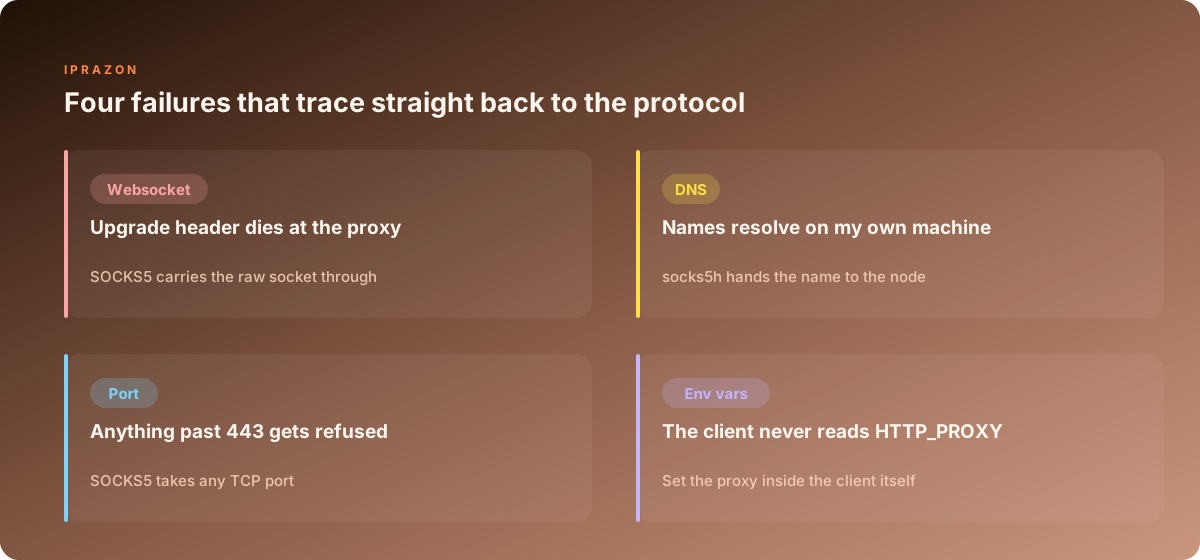
A websocket starts life as an ordinary HTTP request carrying Upgrade: websocket and Connection: Upgrade. The server answers 101 Switching Protocols and from that moment the socket stops speaking HTTP at all. An HTTP proxy that parses requests and responses has to be built to recognise that handshake, pass the two headers untouched, forward a 101 back to the client and then stop interpreting the bytes. Plenty of proxy software does none of that. It strips hop by hop headers, sees a status code it has no branch for, and closes the connection as malformed.
For wss:// the picture improves, because the client opens a CONNECT tunnel first and the proxy never sees the handshake at all. It reads CONNECT panel.example.com:443, opens the socket, and everything after that is opaque TLS. The proxy has nothing to strip. For plain ws:// there is no tunnel and the handshake goes through the proxy in the open, which is exactly where it dies.
SOCKS5 has no opinion on any of this. The client greets the node, authenticates, names a host and a port, and gets back a TCP stream. Whether the bytes in that stream are HTTP, a websocket frame, an SSH banner or a binary protocol nobody documented, the node moves them without reading them. Every streaming job I run now goes over SOCKS5 addresses that carry any port, and the frozen widget problem disappeared the day I switched.
One detail worth writing down. If a socket connects and then dies after roughly 60 seconds of silence, the protocol is fine and an idle timeout is closing you. I send a ping frame every 30 seconds on long lived sockets and the disconnects stopped.
DNS leaves my machine and the target reads the wrong region
This one cost me a whole scraping run. I needed regional pricing from a retail site through addresses in three countries, and the results came back nearly identical across all three. Same currency block, same store code, same delivery estimates. The addresses were correct, I checked them one by one through a detection page.
The name lookup was the culprit. My tool was configured with socks5://, which tells the client to resolve the hostname locally and then ask the node to connect to the resulting IP. So my own resolver at home answered the query. The site runs behind a CDN that steers visitors by the resolver's location, my resolver sits where I live, and the CDN handed back an edge node for my region. The proxy carried the request to that edge faithfully. The address in the header logs looked perfect and the content came from the wrong place.
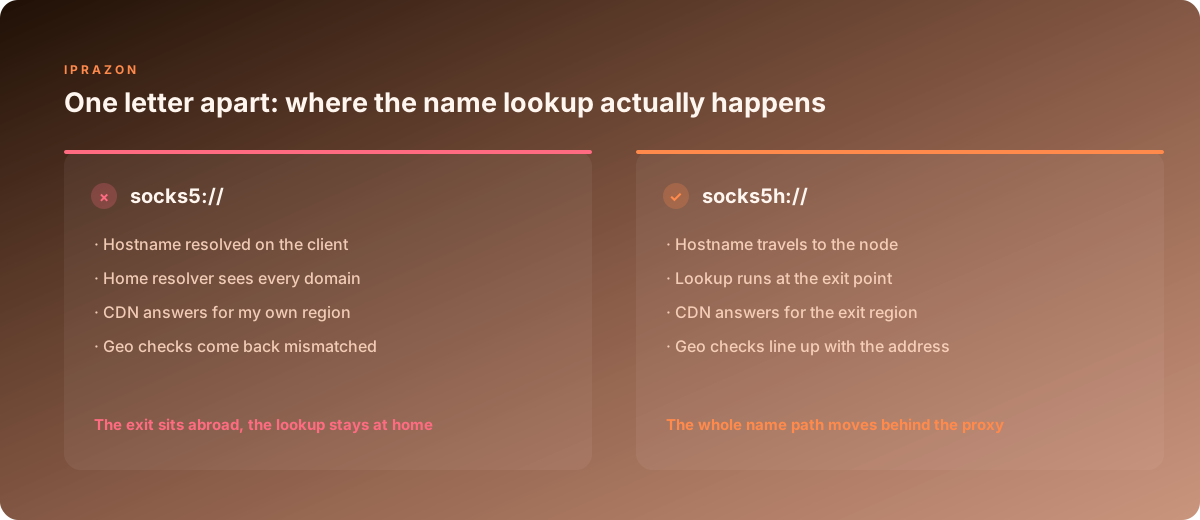
Out of 3000 product pages in that run, 82 percent carried region data that matched my home city. I rewrote the config to socks5h://, reran the same list, and the mismatch dropped to under 2 percent. The remaining fraction were pages where the site had cached a redirect on my session cookie.
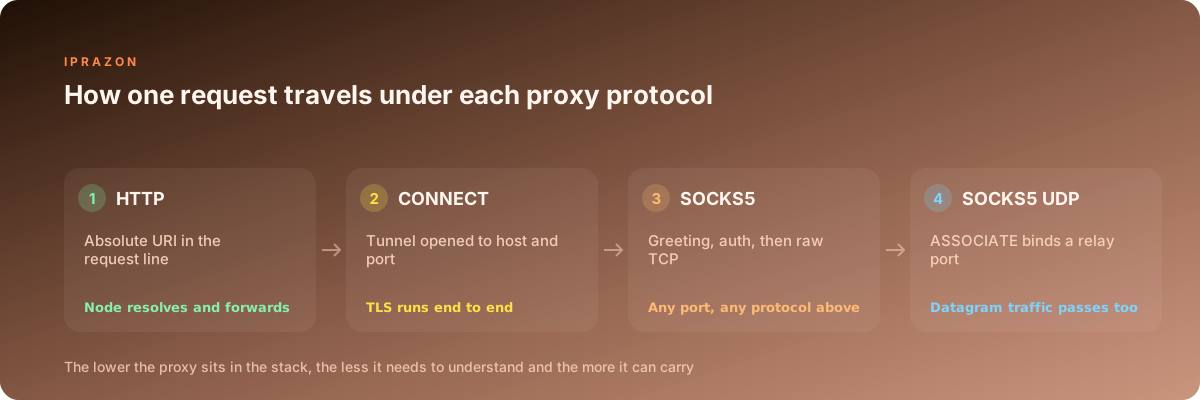
An HTTP proxy never has this problem in the first place. The client sends the full URL in the request line, the node reads the hostname out of it and resolves the name itself. Same for CONNECT: the tunnel request carries host:port in text form, so the resolution happens at the exit. The local resolution trap belongs to SOCKS specifically, and only when the scheme is written without the trailing letter.
There is a privacy angle too. When names resolve at home, my ISP resolver builds a log of every domain I touch during a run. The exit address hides the connection and leaves the query trail behind. For account work that gap matters as much as the address itself.
The port sits outside 80 and 443 and nothing leaves the client
A client asked me to pull data from an internal reporting API sitting on port 8443, then later from a Postgres replica on 5432. Both went through the same HTTP proxy I used for web crawling. Both returned 403 Forbidden from the proxy itself, before any packet reached the target.
Almost every HTTP proxy build ships with a CONNECT port allowlist, and the default list is short: 443 and sometimes 563. The reasoning is sound from the operator side, since an unrestricted tunnel turns the proxy into a general relay for mail spam and worse. From my side it means anything on an unusual port stops at the door with a proxy generated error, and the error text rarely says which port was refused.
SOCKS5 carries no such list by design. The connect request names an address and a port, and any port is a valid value. That is why every one of these jobs sits on SOCKS in my setup:
| Job | Port | HTTP proxy | HTTPS via CONNECT | SOCKS5 |
|---|---|---|---|---|
| plain page fetch | 80 | works | works | works |
| TLS page fetch | 443 | needs CONNECT | works | works |
| internal API | 8443 | refused | usually refused | works |
| database replica | 5432 | refused | refused | works |
| SSH to a build box | 22 | refused | refused | works |
| mail submission | 587 | refused | refused | works |
| game or voice traffic | UDP | no path | no path | works via ASSOCIATE |
That last row deserves a note, because it trips people up. SOCKS5 defines a UDP ASSOCIATE command that binds a relay port on the node and forwards datagrams. Support for it varies by node software, so I test it before promising a client anything. TCP works everywhere; the datagram path needs one check with a small script.
The application ignores HTTP_PROXY and connects direct
The nastiest failure in this list, because nothing errors out. The job runs, the data arrives, and every request went from my real address. I found it during an account warmup when the target site greeted a supposedly foreign profile with content for my own city.
Environment variables are a convention, honoured by whichever library felt like implementing them. Here is what I have measured across the tools on my machines.
| Tool | Reads HTTP_PROXY | Reads ALL_PROXY | SOCKS support |
|---|---|---|---|
| curl | yes | yes | socks5 and socks5h |
| python requests | yes | only with the socks extra | via PySocks |
| node fetch and undici | no, needs a dispatcher | no | via a proxy agent |
| Go net/http | yes, through ProxyFromEnvironment | no | manual dialer |
| Chromium | no, takes a launch flag | no | flag only, no SOCKS auth |
| Playwright and Puppeteer | no, takes a launch option | no | option only |
Chromium is the one that cost me a week of account warmups. It ignores the variables on every platform I run, wants --proxy-server= on the command line, and refuses username and password on a SOCKS5 address entirely. There is no flag for SOCKS credentials. The workarounds are an IP whitelist on the node side, a local relay that adds the credentials, or an extension that answers the auth prompt. I use whitelisting, since my pool lets me pin allowed source addresses per port and the browser then needs no credentials at all.
My rule now: configure the proxy inside the client, in code or in the launch options, and treat the environment variables as a convenience for shell tools. Then verify. I hit a detection endpoint through the configured client as the first request of every run, compare the returned address against the one I expect, and abort the job on a mismatch. That check costs one request and has caught four silent bypasses.
Certificate errors when HTTPS runs through a plain HTTP proxy
A colleague sent me a screenshot of a certificate warning on a site that works perfectly in a normal browser, and asked whether the address was compromised. It was a configuration mixup, and the same one shows up in support tickets constantly.
The word HTTPS carries two different meanings in proxy configuration, and confusing them produces exactly this warning.
The first meaning: a proxy that tunnels TLS traffic through CONNECT. Your browser talks to the proxy in plain text to open the tunnel, then negotiates TLS directly with the target site behind it. Certificate validation succeeds because the certificate really does come from the target. This is what most people mean when they say they bought an HTTPS proxy, and it is what HTTPS proxies that handle CONNECT tunnels give you.
The second meaning: the link between your client and the proxy is itself wrapped in TLS, so the proxy address is written as https://node:8443. Now there are two TLS sessions, one to the proxy and one to the site through the tunnel. Support for this is patchy. curl handles it with --proxy-cacert, Chromium wants a PAC file or a HTTPS scheme in the proxy config, and many libraries silently downgrade to a plain connection.
The certificate warning appears when a proxy is doing interception: terminating TLS itself, presenting its own certificate, and re establishing a session to the target. Corporate gateways do this deliberately with a certificate pushed to every workstation. A commercial node doing it without telling you is a reason to stop the run. I test each new address with a single command that prints the issuer chain, and I compare the issuer against what the site normally presents.
 # what issued the certificate my client actually sees
curl -x http://user:pass@203.0.113.41:8080 -vI https://example.com 2>&1 | grep "issuer:"
For simple collection over plain HTTP endpoints I still keep a handful of HTTP proxies for straightforward request work in rotation, because the node can read the request line and log per URL, which makes debugging a broken crawler faster than any tunnel.
socks5 and socks5h: one letter that moves the whole name path
The distinction hides in a single character and controls where hostnames turn into addresses. Both schemes speak the same wire protocol; the difference lives entirely in the client.
With socks5:// the client resolves the hostname first and sends a 4 byte IPv4 address in the connect request, address type 0x01. With socks5h:// the client sends the hostname as a length prefixed string, address type 0x03, and the node performs the lookup. The h stands for hostname handling at the far end. SOCKS4 has the same split, written as socks4 and socks4a, and the same trap.
 # resolves at home, connects through the node
curl --proxy socks5://user:pass@203.0.113.41:1080 https://ifconfig.me

 # resolves at the node, nothing leaks from my resolver
curl --proxy socks5h://user:pass@203.0.113.41:1080 https://ifconfig.me
Where it stops being cosmetic:
Geo targeted content, as in the run I described earlier, since CDN steering follows the resolver. Split horizon DNS, where an internal hostname only answers correctly from inside the network the node sits in; the local lookup returns NXDOMAIN and the job dies with a name error that looks like a typo. Onion addresses, which have no public DNS record at all and only work with remote resolution.
Which schemes your tooling accepts varies, so this is the table I keep pinned.
| Client | socks5 | socks5h | Notes |
|---|---|---|---|
| curl | yes | yes | also accepts --socks5-hostname |
| python requests | yes | yes | needs the socks extra installed |
| Go | manual | manual | golang.org/x/net/proxy resolves remotely |
| Chromium | flag | flag | one host resolver setting covers both |
| A-Parser | yes | yes | per task profile setting |
| ZennoPoster | yes | yes | set per project, not globally |
For scraping work where region accuracy decides whether the data is usable at all, I run addresses picked for scraping runs with the h form everywhere, and I audit the config files quarterly because a copied line from an old project reintroduces the bug quietly.
What each protocol carries, side by side
Here is the capability breakdown I hand to anyone setting up a pool from scratch. It answers the question of which protocol to buy before the first line of code exists.
| Capability | HTTP | HTTPS with CONNECT | SOCKS5 |
|---|---|---|---|
| Layer it works at | application | application | session, below application |
| Plain HTTP requests | native | via tunnel | via tunnel |
| TLS requests | needs CONNECT | native | native |
| Arbitrary TCP ports | no | allowlist only | yes |
| UDP traffic | no | no | yes, ASSOCIATE |
| Websockets over ws | depends on build | via tunnel | yes |
| Websockets over wss | via tunnel | yes | yes |
| Remote DNS | yes | yes | with socks5h |
| Authentication | Proxy-Authorization header | same header | username and password method |
| Node can read headers | yes | no | no |
| Node can cache responses | yes | no | no |
| Overhead per connection | one request line | one round trip | two short round trips |
| Traffic accounting accuracy | per request | per connection | per connection |
Read the table from the bottom two rows up if you are choosing for a mixed workload. A node that can read headers can also log, cache and rewrite them, which helps when you own the crawler and want per URL statistics. A node that reads nothing carries anything. My own split runs roughly 70 percent SOCKS5 and 30 percent HTTP across a pool of several hundred addresses, and the HTTP share exists purely for jobs where I want the request level logs.
Connection strings I keep in a note file
Every one of these is a line I paste, with placeholders where the address and credentials go. Percent encode special characters in the password, since a # or an @ inside credentials silently truncates the URL and the client then tries to connect to a host that does not exist.
 # HTTP proxy, plain endpoints
export HTTP_PROXY=http://user:pass@203.0.113.41:8080
curl -x $HTTP_PROXY http://httpbin.org/ip

 # HTTPS through a CONNECT tunnel
curl -x http://user:pass@203.0.113.41:8080 https://httpbin.org/ip

 # proxy link itself wrapped in TLS
curl --proxy https://user:pass@203.0.113.41:8443 --proxy-cacert node-ca.pem https://httpbin.org/ip

 # SOCKS5, name resolved at the node
curl --proxy socks5h://user:pass@203.0.113.41:1080 https://httpbin.org/ip

 # arbitrary TCP through SOCKS5
ssh -o ProxyCommand="nc -X 5 -x 203.0.113.41:1080 %h %p" deploy@build.example.com
# python requests, both families in one dict
proxies = {
"http": "http://user:pass@203.0.113.41:8080",
"https": "http://user:pass@203.0.113.41:8080",
}
socks = {
"http": "socks5h://user:pass@203.0.113.41:1080",
"https": "socks5h://user:pass@203.0.113.41:1080",
}// node, undici does not read the environment on its own
import { ProxyAgent, setGlobalDispatcher } from 'undici';
setGlobalDispatcher(new ProxyAgent('http://user:pass@203.0.113.41:8080')); # chromium family, credentials go through whitelisting on the node
chromium --proxy-server="socks5://203.0.113.41:1080" \
--host-resolver-rules="MAP * ~NOTFOUND , EXCLUDE 203.0.113.41"That last host resolver rule is the piece people miss. Without it Chromium keeps resolving names locally even while routing connections through SOCKS, which puts you back in the wrong region problem from earlier.
Authentication drops and every request returns 407
A 407 Proxy Authentication Required on the first request usually means credentials never left the client, and there are four reasons I run into.
The password contains a reserved character. An @ inside a password splits the URL at the wrong point and the client reads a host that does not resolve. Percent encoding fixes it: @ becomes %40, # becomes %23, : becomes %3A.
The client sends credentials only after a challenge, and something in between eats the challenge. curl handles the retry, some HTTP libraries do it once per connection, and a keepalive pool can reuse a socket that was authenticated on a different set of credentials.
The tool uses SOCKS5 with a client that has no support for the username and password method defined for it. Chromium is the headline example. The node offers method 0x02, the client only advertises 0x00, negotiation fails and the socket closes without a readable error. In a packet capture it looks like an instant reset.
The source address changed and a whitelist no longer matches. If you authenticate by IP, a home connection that renews its address overnight locks you out of your own pool. I keep both methods active on my ports: credentials for scripts, whitelisting for browsers, and a small job that pushes my current address into the whitelist when it changes.
For automation that runs unattended, credentials beat whitelisting, because a whitelist entry that goes stale halts the run until someone notices. My ZennoPoster projects run with per project credentials so a change on one project cannot take the rest down with it.
How the pick looks across my three regular jobs
Price collection from public catalogues runs on HTTP for the endpoints that answer over plain HTTP and CONNECT for the TLS ones, on the same nodes. Volume matters more than anything exotic here, roughly 40,000 requests a day across 20 threads, and per URL logging on the node saves me time whenever a parser starts returning empty fields. Nothing in the job touches an unusual port.
Account work in an antidetect browser runs on SOCKS5 with whitelisting, one address pinned per profile for its whole life. The browser resolves through the node, the profile keeps a stable exit for weeks, and the sockets that the site opens for its own live features pass without special handling. This is the workload where protocol choice is least negotiable, since a single websocket the site uses for notifications will fail loudly on the wrong setup.
API and infrastructure work, meaning internal endpoints, database replicas and SSH into build machines, runs exclusively on SOCKS5 for the port reason alone. I keep datacenter addresses on owned hardware for this, because latency to the node dominates the round trip on a chatty database protocol and a stable route matters more than a large pool.
When a new job lands on my desk I ask three questions in order. Does anything in it speak something other than HTTP, and if so it goes to SOCKS5 immediately. Does the target steer content by region, and if so the scheme gets the h. Does the tool I plan to use actually apply the proxy I hand it, and that one gets answered with a detection request before the run starts, every time. Those three questions take a minute and have saved me runs measured in days. For the mixed jobs where the answer changes halfway through, a SOCKS5 pool that covers every case at once removes the decision entirely, which is why most of my pool sits there.
More from this series: how to set up a proxy on Windows and how to scrape data from a website with Python.