How to configure a proxy on a Linux server and in Docker: layer by layer, from the image to the cron job
The report looked healthy for eleven nights running. Six hosts, eight containers on each, a price collector walking 340 category pages per pass, the file always sitting in the bucket before the morning meeting. Then one target started answering a single host with an empty catalogue, and I went looking for which of my addresses had worn itself out. None of them had. Running env | grep -i proxy on that host printed exactly what I had exported weeks earlier, every container was up, and the collector inside those containers had been going out through the server's own address since the very first night.
The address was written once, in the layer that covers the least. A Linux box keeps that setting in six separate places, and no place reads any other one. Below is each layer in order, with the command that writes the address, the command that reads it back, and the failures I collected while working out where the boundaries actually sit. Figures come from a standing job on 6 hosts, 48 containers, around 39,000 requests a night.
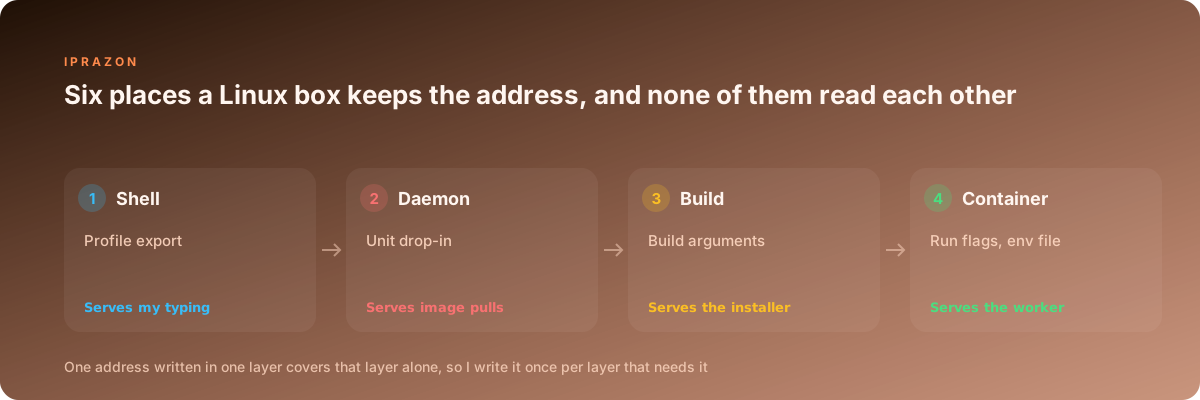
The shell layer covers what I type
This is where nearly everyone starts, and it works perfectly for the thing it covers. An exported variable reaches curl, wget, pip and apt when I run them by hand in that same session.
cat > /etc/profile.d/collector-proxy.sh <<'EOF'
export http_proxy="http://u48210:qP7xR2@node07.proxy-edge.net:3128"
export https_proxy="$http_proxy"
export HTTP_PROXY="$http_proxy"
export HTTPS_PROXY="$http_proxy"
export no_proxy="localhost,127.0.0.1,::1,10.0.0.0/8,.svc.internal"
export NO_PROXY="$no_proxy"
EOF
chmod 0644 /etc/profile.d/collector-proxy.sh
$ . /etc/profile.d/collector-proxy.sh
$ env | grep -i proxy | sort
HTTPS_PROXY=http://u48210:qP7xR2@node07.proxy-edge.net:3128
HTTP_PROXY=http://u48210:qP7xR2@node07.proxy-edge.net:3128
NO_PROXY=localhost,127.0.0.1,::1,10.0.0.0/8,.svc.internal
http_proxy=http://u48210:qP7xR2@node07.proxy-edge.net:3128
https_proxy=http://u48210:qP7xR2@node07.proxy-edge.net:3128
no_proxy=localhost,127.0.0.1,::1,10.0.0.0/8,.svc.internalWriting both letter cases looks like superstition until you meet the third tool that reads only one of them. My own count says 17 percent of the silent bypasses on this project came from a library that looked for a name I had set in the other case. Six variables per host, every time, no exceptions.
| Tool | Names it reads | Behaviour worth knowing |
|---|---|---|
| curl and libcurl | http_proxy lowercase only, https_proxy in both cases, ALL_PROXY, NO_PROXY | plain HTTP takes the lowercase name alone, because an inbound request header of the same name would otherwise set it |
| wget | lowercase names, plus use_proxy in wgetrc | a value in wgetrc overrides the environment silently |
| Python requests and urllib | both cases, the uppercase pair winning a conflict | NO_PROXY matches by suffix, so a network range written as a mask matches nothing |
| Go net/http | both cases, uppercase first | a value carrying no scheme is read as an address, and the port has to be there |
| apt | Acquire::http::Proxy in its own config, environment as a fallback | apt run under sudo loses the environment unless the variables sit in the sudoers keep list |
| git | http.proxy in git config, environment as a fallback | the config value wins over anything exported |
| docker CLI | the proxies block in the client config file | this one writes settings into containers it starts, covered further down |
The suffix matching row deserves the extra second. A network range in NO_PROXY works in Go and in the engine daemon, and it matches nothing at all in curl or in requests, so an internal service addressed by a raw address keeps going out through the tunnel while a service addressed by name skips it. I list internal hosts by name and by address, both forms, on every host.
The container starts in an empty room
The first thing to accept: a container inherits nothing from the shell that typed the run command. Here is the whole environment a fresh container gets.
$ docker run --rm alpine:3 env
PATH=/usr/local/sbin:/usr/local/bin:/usr/sbin:/usr/bin:/sbin:/bin
HOSTNAME=6b1f0c0a4d2e
HOME=/root
The reason is in the architecture. My CLI call goes over a socket to a daemon that systemd started long before I logged in, and that daemon builds the container environment from two inputs: the ENV lines baked into the image, and whatever the run call carried with it. My login session sits outside that path entirely, so an export in a profile file has no route into the namespace.
The second trap is the loopback address. A forwarder listening on the host's 127.0.0.1 is unreachable from the container, since the container has its own loopback with nothing on it. The gateway is what I need, and it differs per network.
$ docker run --rm alpine:3 ip route
default via 172.17.0.1 dev eth0  src 172.17.0.4
$ docker network inspect collectors -f '{{(index .IPAM.Config 0).Gateway}}'
172.22.0.1
My endpoints answer on public addresses, so the gateway question only comes up on the two hosts where I keep a local forwarder for header rewriting. For everything else I point containers straight at a datacenter pool with fixed exits, which removes an entire class of local networking questions from the setup: one hostname and one port, identical in every layer, resolvable from inside the container without a gateway hop.
The engine daemon reads a file of its own, and it covers pulls
Image pulls travel out through the daemon, so the daemon needs the address written where systemd will hand it over. A drop-in file does that.
mkdir -p /etc/systemd/system/docker.service.d
cat > /etc/systemd/system/docker.service.d/proxy.conf <<'EOF'
[Service]
Environment="HTTP_PROXY=http://u48210:qP7xR2@node07.proxy-edge.net:3128"
Environment="HTTPS_PROXY=http://u48210:qP7xR2@node07.proxy-edge.net:3128"
Environment="NO_PROXY=localhost,127.0.0.1,registry.svc.internal,10.0.0.0/8,172.17.0.0/16"
EOF
systemctl daemon-reload
systemctl restart docker
$ systemctl show --property=Environment docker
Environment=HTTP_PROXY=http://u48210:qP7xR2@node07.proxy-edge.net:3128 HTTPS_PROXY=http://u48210:qP7xR2@node07.proxy-edge.net:3128 NO_PROXY=localhost,127.0.0.1,registry.svc.internal,10.0.0.0/8,172.17.0.0/16Now the boundary that cost me a night. This setting covers the daemon's own traffic: image pulls, image pushes, registry authentication. Container traffic never touches it. I had the drop-in file in place, watched a pull succeed through the tunnel, and concluded the host was configured. Forty minutes of collector output later, every row carried the host's own address.
The internal registry belongs in the skip list on the same line. Without it a pull of a 900 MB image walks out to the endpoint and back into the same rack, which added 4 minutes to a deploy that normally takes 25 seconds.
Build time, and the address that must not stay inside the image
Package installs during a build need the address too, and there are two ways to give it. One of them follows the image everywhere it ever gets copied.
ENV http_proxy=http://u48210:qP7xR2@node07.proxy-edge.net:3128
RUN apt-get update && apt-get install -y --no-install-recommends libxml2-dev
$ docker image inspect collector:leaky -f '{{json .Config.Env}}'
["PATH=/usr/local/bin:/usr/bin:/bin","http_proxy=http://u48210:qP7xR2@node07.proxy-edge.net:3128"]The credential is in the image metadata, readable by anyone who can pull the tag, and it is still there after the image travels to a build cache in another region. The build argument route keeps it out. Those six names are predefined by the builder, so no ARG line is needed for them to work.
$ docker build --build-arg http_proxy=http://u48210:qP7xR2@node07.proxy-edge.net:3128 \
               --build-arg https_proxy=http://u48210:qP7xR2@node07.proxy-edge.net:3128 \
               --build-arg no_proxy=localhost,127.0.0.1,registry.svc.internal \
               -t collector:1.4 .
$ docker image inspect collector:1.4 -f '{{json .Config.Env}}'
["PATH=/usr/local/bin:/usr/bin:/bin","PYTHONUNBUFFERED=1"]
Apt has a habit of ignoring the environment when it runs under a stripped shell, so on images where the install step matters I write its own config line during the build and delete it in the same layer:
RUN printf 'Acquire::http::Proxy "http://u48210:qP7xR2@node07.proxy-edge.net:3128";\n' \
      > /etc/apt/apt.conf.d/01proxy \
 && apt-get update && apt-get install -y --no-install-recommends libxml2-dev \
 && rm -f /etc/apt/apt.conf.d/01proxy && rm -rf /var/lib/apt/lists/*
Same layer matters. A file created in one instruction and removed in the next still lives in the earlier layer, and docker history will happily show it to anyone who asks.
Handing the address to a container that is about to run
This is the layer my collector actually reads, and it takes an env file per worker. One file, one address, one worker, so an odd result always traces back to a named node.
$ cat /etc/collector/w03.env
HTTP_PROXY=http://u48210:qP7xR2@node07.proxy-edge.net:3128
http_proxy=http://u48210:qP7xR2@node07.proxy-edge.net:3128
HTTPS_PROXY=http://u48210:qP7xR2@node07.proxy-edge.net:3128
https_proxy=http://u48210:qP7xR2@node07.proxy-edge.net:3128
NO_PROXY=localhost,127.0.0.1,::1,pg.svc.internal,10.0.0.0/8
no_proxy=localhost,127.0.0.1,::1,pg.svc.internal,10.0.0.0/8
EXIT_ID=node07

$ install -o collector -g collector -m 0600 /etc/collector/w03.env /etc/collector/w03.env
$ docker run -d --name w03 --env-file /etc/collector/w03.env collector:1.4
Mode 600 on that file is worth setting on day one. Anyone in the docker group can read the same credential back out of docker inspect, so the file permission is one part of a fence that also needs a short group membership list.
There is a second way to reach this layer, and it catches every container the client starts without touching a single run command.
{
  "proxies": {
    "default": {
      "httpProxy": "http://u48210:qP7xR2@node07.proxy-edge.net:3128",
      "httpsProxy": "http://u48210:qP7xR2@node07.proxy-edge.net:3128",
      "noProxy": "localhost,127.0.0.1,pg.svc.internal,10.0.0.0/8"
    }
  }
}
That block lives in the client config file under the home directory of whoever runs the CLI. It is convenient and it is easy to forget, which is a bad combination: a container that picks up an address from a file nobody remembers writing is harder to explain than a container with no address at all. I keep it on developer machines and stay with explicit env files on the collection hosts.
For the tunnel itself I hand these containers a SOCKS5 endpoint for the worker, since a SOCKS tunnel carries any protocol the collector opens, including the two targets that speak over a raw socket and would have needed a second forwarder in front of them.
The same six names inside a compose file
Compose gives three separate places to write this, and they serve three separate consumers: build arguments feed the builder, the environment block feeds the running process, and an env file does the same job from disk. An anchor keeps them consistent.
x-exit: &exit-node07
  HTTP_PROXY: http://u48210:qP7xR2@node07.proxy-edge.net:3128
  http_proxy: http://u48210:qP7xR2@node07.proxy-edge.net:3128
  HTTPS_PROXY: http://u48210:qP7xR2@node07.proxy-edge.net:3128
  https_proxy: http://u48210:qP7xR2@node07.proxy-edge.net:3128
  NO_PROXY: localhost,127.0.0.1,pg,redis,10.0.0.0/8
  no_proxy: localhost,127.0.0.1,pg,redis,10.0.0.0/8

services:
  w03:
    image: collector:1.4
    build:
      context: .
      args:
        http_proxy: http://u48210:qP7xR2@node07.proxy-edge.net:3128
        https_proxy: http://u48210:qP7xR2@node07.proxy-edge.net:3128
    environment:
      <<: *exit-node07
      EXIT_ID: node07
    depends_on: [pg, redis]
Service names go in the skip list, because compose puts every service on one network where pg and redis resolve by name. Send those through the tunnel and the collector spends its first 30 seconds trying to open a database connection somewhere on the far side of the world, then dies with a timeout that reads like a database outage.
One more thing compose does on its own: it expands variable references inside the file before anything starts. A password holding that expansion character arrives at the container truncated at the character, and the login fails with a message about bad credentials that sends you off checking the wrong system. Doubling the character escapes it. The resolved file settles the argument in one command:
$ docker compose config | sed -n '/w03:/,/depends_on/p' | grep -i proxy
      HTTPS_PROXY: http://u48210:qP7xR2@node07.proxy-edge.net:3128
      HTTP_PROXY: http://u48210:qP7xR2@node07.proxy-edge.net:3128
      NO_PROXY: localhost,127.0.0.1,pg,redis,10.0.0.0/8
A unit for the collector that stays up for hours
Half my passes run without a container at all, as a long lived process under systemd, and that unit needs its own copy. A template unit at /etc/systemd/system/collector@.service lets one file serve every worker on the host.
[Unit]
Description=Collector worker %i
After=network-online.target

[Service]
User=collector
EnvironmentFile=/etc/collector/%i.env
ExecStart=/opt/collector/venv/bin/python -m collector.run --worker %i
Restart=always
RestartSec=20

[Install]
WantedBy=multi-user.target
$ systemctl daemon-reload && systemctl enable --now collector@w03
$ systemctl show -p Environment collector@w03 | tr ' ' '\n' | grep -i proxy | head -3
Environment=HTTP_PROXY=http://u48210:qP7xR2@node07.proxy-edge.net:3128
http_proxy=http://u48210:qP7xR2@node07.proxy-edge.net:3128
HTTPS_PROXY=http://u48210:qP7xR2@node07.proxy-edge.net:3128Two systemd habits save time here. It runs no shell, so a reference to another variable stays a literal string and a value containing spaces has to be quoted in full. And the percent character is a specifier marker, so a password containing one needs it doubled in the unit file, while the same password sits unescaped in an environment file. That asymmetry has cost an evening to most people who keep both file types on one host.
systemctl edit collector@w03 writes a drop-in for one instance when a single worker needs a different node for a night. The override lands in its own directory and survives a package upgrade, and systemctl cat collector@w03 prints the merged result so I can read what the service will actually get.
Cron hands the job almost nothing
Cron is the layer where careful work goes quietly wrong, because a cron job starts with an environment of about five variables and no profile file ever gets sourced.
$ crontab -l
* * * * * env > /tmp/cronenv 2>&1
$ cat /tmp/cronenv
SHELL=/bin/sh
PATH=/usr/bin:/bin
PWD=/home/collector
LOGNAME=collector
HOME=/home/collector
No proxy names in that list, no PATH entry for the virtual environment, no locale. A collection script that worked on the command line for six weeks runs from cron and goes straight out through the host address, at three in the morning, into a target that counts requests per address. My share of that failure class was 9 percent of the 214 bad runs.
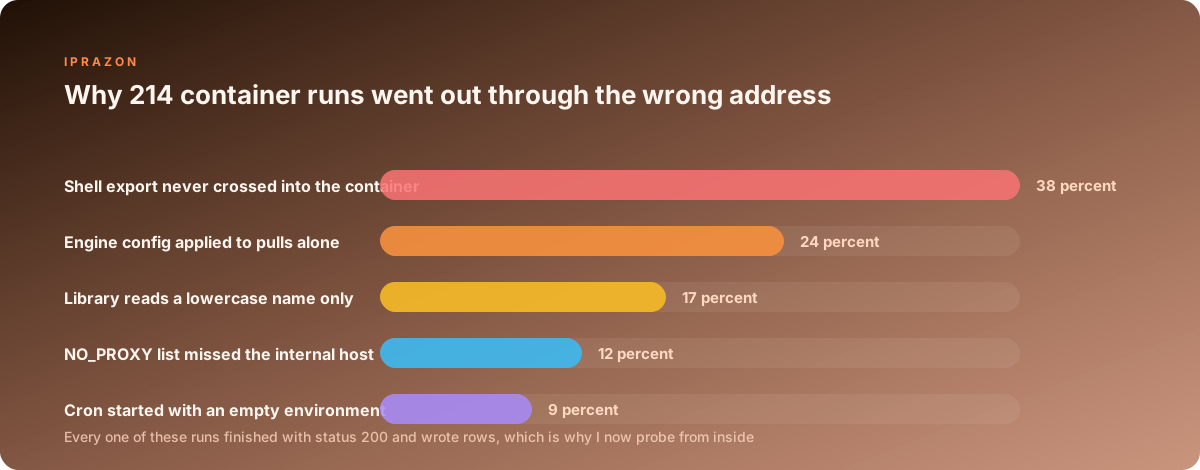
The fix is to source the file inside the job command, with auto export switched on around it so every name in the file becomes an environment variable:
SHELL=/bin/bash
PATH=/opt/collector/venv/bin:/usr/local/bin:/usr/bin:/bin
MAILTO=ops@svc.internal

12 3 * * * set -a; . /etc/collector/w03.env; set +a; \
  /opt/collector/run.sh --worker w03 >> /var/log/collector/w03-\%Y\%m\%d.log 2>&1
The escaped percent characters in that log name are mandatory. Cron reads a bare percent as a newline and passes everything after it to the command on standard input, so an unescaped date format turns the job into a one line command with a stack of text stuffed into its input, and the log file never appears. The first three times I met that behaviour I was convinced the script had crashed before writing anything.
Scheduled work has one property that shapes how I buy for it: the passes are predictable, they repeat nightly, and the address has to be the same one the target saw yesterday. That is why the cron hosts run on private addresses for scheduled passes, with a monthly rental for a standing job so the node list I wrote into 48 env files stays valid for the whole reporting period and a nightly job never wakes up pointing at a node that moved.
Reading the address back from inside the container
Every layer above writes something. This is the layer that tells me whether the writing worked, and it runs before the pass, on every worker, as part of the start script.
$ docker exec w03 env | grep -i proxy | sort | wc -l
6
$ docker exec w03 curl -s --max-time 10 https://echo.svc-probe.net/ip
203.0.113.207
$ docker exec w03 curl -s -o /dev/null -w '%{remote_ip} %{http_code} %{time_connect}\n' \
    https://target.example.com/catalog
198.51.100.14 200 0.214
$ docker exec w03 getent hosts target.example.com
2001:db8::7 target.example.com
That last line is a finding, quietly. The name resolved inside the container, which means DNS went out over the host's resolver while the request body went through the tunnel. For an HTTP endpoint that split is harmless. For a SOCKS tunnel it decides whether the target ever learns which resolver I use, and the fix is one character in the scheme.
| Probe | Command | The answer I accept | What a different answer means | |
|---|---|---|---|---|
| Variable count | `docker exec w03 env \ | grep -ci proxy` | 6 | a missing case pair, and some library in the image is going direct |
| Exit address | docker exec w03 curl -s https://echo.svc-probe.net/ip | the address I assigned to this worker | the run flags never arrived, or a value in the image is winning | |
| Skip list | docker exec w03 curl -s -o /dev/null -w '%{remote_ip}' http://pg:5432 | the container network address of the database | internal traffic is taking a round trip through the endpoint | |
| Name resolution | docker exec w03 getent hosts target.example.com | an answer for HTTP endpoints, no answer under socks5h | a local answer under a SOCKS tunnel means names are resolving on my side | |
| Header shape | docker exec w03 curl -s https://echo.svc-probe.net/headers | the header set my collector sends | a forwarded-for header appearing here means a hop I did not configure |
The scheme difference is small and it changes behaviour completely. socks5:// hands the tunnel an address that the container resolved locally, and socks5h:// hands it a name and lets the exit resolve it. I run the second form everywhere, since a target comparing the geography of the resolver against the geography of the connecting address gets one consistent answer.
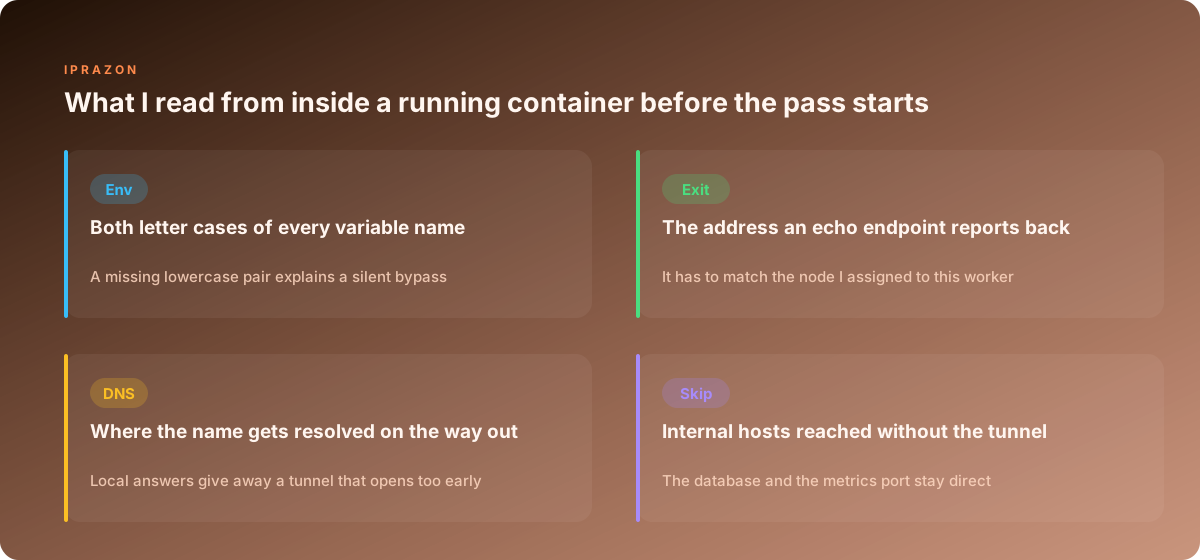
A start script that runs those four probes and refuses to continue on a mismatch turned the whole class of silent bypasses into a loud failure at second 3 of the pass. Cheap to write, roughly 20 lines. It has stopped 11 bad passes since I added it, and 9 of those were an env file that had been edited on one host and never copied to the other five.
What the log carries, and the sheet I keep per host
One line per worker start, written before the first request goes out, holding every layer that had a say.
{"worker":"w03","host":"col-04","image":"collector:1.4",
 "layer_env":"file:/etc/collector/w03.env","exit_id":"node07",
 "exit_seen":"203.0.113.207","scheme":"socks5h","vars":6,
 "no_proxy_hosts":["pg","redis","10.0.0.0/8"],
 "dns_local":false,"daemon_proxy":true,"probe_ms":412,
 "started":"03:12:07"}
Three fields do most of the work. exit_seen compared against exit_id catches a worker running through the wrong node, which happens after any edit to the env files. vars catches the case pair problem before a library does. And daemon_proxy records whether the engine itself was configured on that host, which matters the morning a pull fails and I need to know if this box was ever set up at all.
Alongside the log I keep a small sheet, one row per host, holding six columns: engine drop-in present, client config present, env file count, unit template installed, cron lines using the source pattern, last probe result. It takes 40 seconds to fill in after a rebuild and it answers the question that always arrives during an incident, which is whether host number 5 is different from the other five in some way nobody wrote down.
The address side of that sheet stays deliberately dull. I run collection on addresses prepared for collection work with IPv4 addresses handed out per container, one node per worker, so the mapping in the env files matches the mapping in the log and both match what the target sees. Nightly passes move a fair amount of data through those tunnels, so addresses with no traffic meter keep the last third of a long pass running at the same rate as the first third, and a pass that holds a steady rate is a pass whose numbers I can compare against yesterday.
Six layers, one address, and every layer writes it separately. Once each layer has a command that writes it and a probe that reads it back, a container going out through the wrong address stops being a discovery made eleven nights later and becomes a start script exiting with a message at second 3.
Two more pieces from this series sit close to this one: where the address gets written on each system and picking the protocol by the job. If you are wiring up a fleet of collection hosts, start from the env file per worker described above and take server addresses pinned per worker so the node list survives every rebuild.