How to scrape data from a website into Excel and CSV without losing rows on the way

The collector is the part everyone talks about. Selectors, headers, threads, retries. Then the run finishes, somebody asks for the file, and the job turns into something else entirely: getting 84,100 records out of memory and into a sheet that a buyer can sort by column without the numbers turning into nonsense.
I ran a price monitoring pass over 9 retail sites for a wholesale buyer. My log said 84,100 rows collected across 26 columns. The file I handed over held 61,300. Nobody had reported an error at any point. The collector was fine, the parser was fine, and I lost 22,800 rows in the five metres between the response object and the cell.
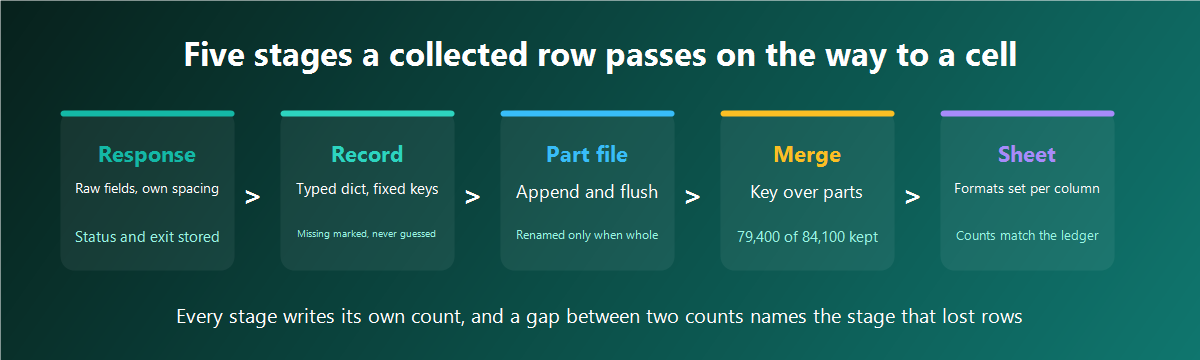
This piece walks that distance stage by stage. Where the columns come from, how a record gets written the moment it exists, what encoding and delimiters do to a file on the way into a spreadsheet, how types get mangled on open, which key decides that two rows are the same thing, how tonight's rows join last night's file, and what happens when a run dies at 04:00 with the file half written. The numbers are all from that project and the two passes that followed it.
The table gets its shape before the first request
I write the column list before I write the collector. The list comes from the question the file has to answer, and that question is never "what was on the page". It is closer to "which items moved and by how much since the last pass", which needs identity, payload and provenance sitting in the same row.
Identity columns answer what the row is about. Payload columns hold what I came for. Provenance columns record how the row got here, and they are the ones people cut when the sheet looks wide. On that first project I had 20 payload columns and no provenance at all, so when the buyer flagged 40 suspicious rows I had no way to tell whether the site had changed, the parser had drifted, or one exit address was being served a different page.
| Group | Columns I keep | Filled by | What goes wrong without it |
|---|---|---|---|
| Identity | site, sku, url_hash, title_norm | the request queue | two sites sharing an article code merge into one item |
| Payload | price_value, currency_code, stock_state, rating, review_count | the parser | nothing to compare between passes |
| Provenance | run_id, fetched_at, http_status, exit_id, parser_version | the runner | a wrong row cannot be traced back to a request |
| Repair | raw_price, raw_stock, field_flags | the normaliser | a failed parse looks the same as an absent field |
Six provenance columns out of 26 felt wasteful until the third pass. Then a column of prices came back 10 times too small on one site, and parser_version told me the answer in one query: the rows carrying the old parser build had a thousands separator being read as a decimal mark. Without that column I would have re-collected the site to find out.
One more decision lands here, and it decides the deduplication section later. A row in my file is one observation of one item at one moment, so the same item collected on 3 nights owns 3 rows. Sheets built around one row per item look tidier and lose the history that the buyer actually pays for.
From response to record: normalise at the moment of extraction
A field is at its most repairable while the response object is still open. That is where I know the site, the encoding the server declared, the currency the page was showing and which selector produced the value. Ten minutes later, in a merge script reading a part file, all of that context is gone and I am guessing.
So my parser returns a dict with fixed keys, every value already typed, and a flags field recording what happened during the conversion.
import re, unicodedata
from decimal import Decimal, InvalidOperation
INVISIBLE = dict.fromkeys(map(ord, " "), " ")
def norm_text(s):
if s is None:
return None
s = unicodedata.normalize("NFKC", s).translate(INVISIBLE)
s = s.replace("\r", " ").replace("\n", " ").replace("\t", " ")
return re.sub(r"\s+", " ", s).strip() or None
def norm_number(s, decimal_mark=","):
raw = norm_text(s)
if raw is None:
return None, "absent"
body = re.sub(r"[^\d.,']", "", raw)
if decimal_mark == ",":
body = body.replace(".", "").replace("'", "").replace(",", ".")
else:
body = body.replace(",", "").replace("'", "")
try:
return Decimal(body), "ok"
except InvalidOperation:
return None, "unparsed:" + raw[:32]Four characters do most of the damage in text columns: the non breaking space, the narrow non breaking space, the zero width space and the soft hyphen. They survive every visual inspection, they break every string comparison, and they turn a merge key into a stranger. Translating them to an ordinary space at extraction removed 3,180 phantom duplicates from my second pass, which was 4 percent of the file.
The decimal mark is a per site setting, never a guess. Two of my 9 sites wrote a comma as the decimal mark and a space as the thousands separator, one used an apostrophe for thousands, and the rest used the pattern most parsers assume. A single global rule turned 1,299.00 into 129,900 on two sites and nobody noticed for 4 nights, because both numbers look like plausible prices in a wide column.
Notice that norm_number returns a reason alongside the value. A failed parse writes the original string into raw_price and a marker into field_flags, so the row survives with a hole in it. Dropping the row would have been easier and would have cost me the one piece of evidence needed to fix the parser.
Writing rows as they arrive, one append at a time
The single most expensive habit in this job is collecting into a list and writing the list at the end. It reads well, it tests well on 50 rows, and it loses the entire night when the process dies at hour 6.
My writer opens the part file once, appends per record, and flushes on a counter. Nothing waits for the end of the run.
import csv, os

FIELDS = ["site", "sku", "url_hash", "title_norm", "price_value", "currency_code",
          "stock_state", "rating", "review_count", "raw_price", "raw_stock",
          "field_flags", "run_id", "fetched_at", "http_status", "exit_id",
          "parser_version"]

class PartWriter:
    def __init__(self, path, flush_every=200):
        new = not os.path.exists(path)
        self.fh = open(path, "a", newline="", encoding="utf-8")
        self.w = csv.DictWriter(self.fh, fieldnames=FIELDS, restval="",
                                extrasaction="raise", quoting=csv.QUOTE_MINIMAL,
                                lineterminator="\r\n")
        if new:
            self.w.writeheader()
        self.n, self.flush_every = 0, flush_every

    def add(self, row):
        self.w.writerow(row)
        self.n += 1
        if self.n % self.flush_every == 0:
            self.fh.flush()
            os.fsync(self.fh.fileno())

    def close(self):
        self.fh.flush()
        os.fsync(self.fh.fileno())
        self.fh.close()
Three arguments there earn their place. restval="" writes an empty field when a key is absent, so a record missing rating still produces a row of the right width. extrasaction="raise" stops the run when a parser hands over a key nobody declared, which is how I learned that site 7 had started returning a delivery estimate that my dict was quietly accepting and my file was quietly dropping. lineterminator="\r\n" keeps the file readable by a spreadsheet on any machine the buyer happens to use.
The flush counter is a trade between speed and exposure. At 200 rows I risk losing under 200 records to a hard kill, and the cost is around 420 fsync calls per part file, which is invisible next to the network time. I ran at 5,000 for one pass to see whether it mattered. It did not go faster in any way I could measure, and the crash that night cost me 4,700 rows.
Threads write to their own part files. One writer per worker, one file per worker, merged later by a script that has all night to be careful. Sharing a single handle across 20 threads produces interleaved lines that no parser will accept, and the corruption shows up in the middle of the file where nobody looks.
Encoding and the delimiter, the two places CSV meets a spreadsheet
A CSV file carries no declaration of its own encoding, so the program opening it has to guess. Spreadsheets guess from the machine's locale settings, which is why the same file looks correct for me and shows a row of accented rubbish for the buyer.
Writing the byte order mark ahead of the utf-8 content settles it. In Python that is the utf-8-sig codec, and it costs 3 bytes at the head of the file. Every spreadsheet I have handed a file to reads it correctly after that.
The delimiter is the second guess, and it is decided by the list separator configured on the opening machine. A file written with commas opens as one long column where the list separator is a semicolon.
| Delivery format | Encoding I write | Delimiter | How the buyer opens it | Failure it removes |
|---|---|---|---|---|
| CSV for a fixed team | utf-8-sig | comma | double click | accented text turning into rubbish |
| CSV for an unknown machine | utf-8-sig | semicolon plus a sep= first line | double click | all 26 columns landing in column A |
| CSV for another program | utf-8 | comma | its own import step | a byte order mark read as part of the header |
| TSV for a database load | utf-8 | tab | a copy command | quoting rules disagreeing between writers |
| XLSX for a person | not applicable | not applicable | double click | types being reinterpreted on open |
The sep=; hint on the first line is the least elegant entry in that table and the one that has saved me the most support messages. A spreadsheet reads that line, applies the delimiter and hides the line. Other readers see a stray first row, which is why the hint goes only on files meant for a human.
Quoting deserves 30 seconds of attention. QUOTE_MINIMAL quotes a field only when it contains the delimiter, a quote character or a line break, and it handles product titles containing commas correctly on its own. The failure comes from fields holding a line break, since a title with an embedded newline turns one record into two, and the second half is a row of garbage that still counts as a row. My norm_text strips line breaks at extraction for exactly this reason, and the writer's quoting is the second layer under it.
Field types and what a spreadsheet does to a column on open
CSV holds text. A spreadsheet reading text has to decide what each value means, and its decisions are confident, silent and permanent once the file is saved back.
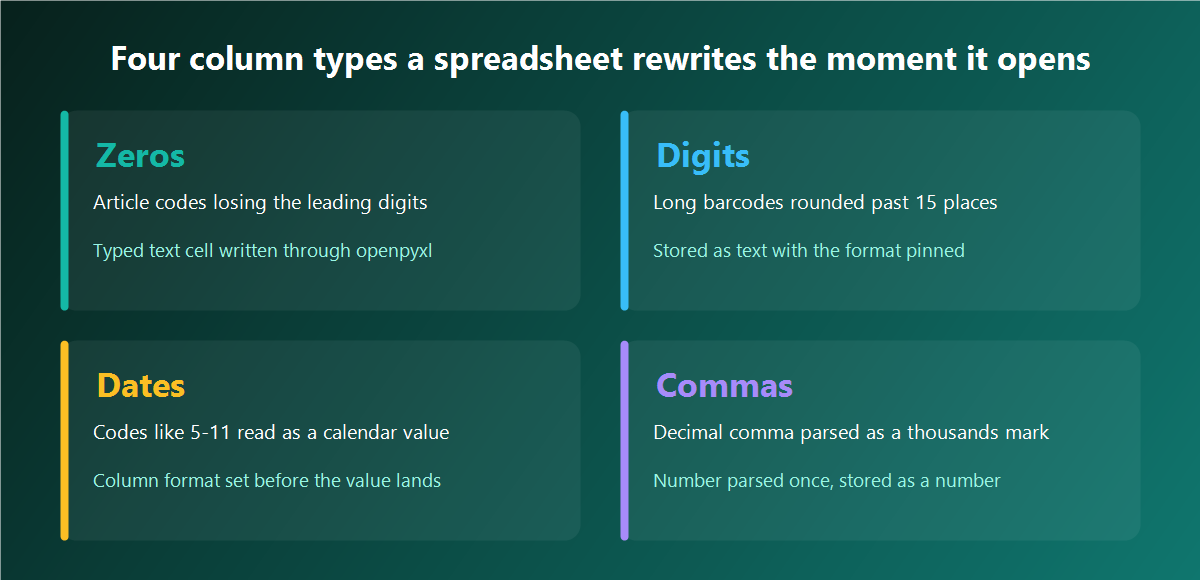
Leading zeros go first. An article code of 00841 becomes the number 841, and the buyer's lookup against their own catalogue misses every row. Long digit strings go second: a 13 digit barcode passes 15 significant digits and comes back in scientific notation with the tail replaced by zeros, so two products separated by their last 3 digits become the same product. Codes shaped like a date go third, and this one is quiet enough to be dangerous, since a size code of 5-11 turns into a calendar value that a buyer reading the sheet has no reason to question.
The fix is the same in all three cases. Hand over an xlsx where the type of every column is stated by me, and the reader has nothing to guess.
from openpyxl import Workbook
from openpyxl.cell import WriteOnlyCell

TEXT_COLS = {"sku", "url_hash", "raw_price", "field_flags"}
NUM_FMT   = {"price_value": "#,##0.00", "rating": "0.0",
             "review_count": "#,##0", "fetched_at": "yyyy-mm-dd hh:mm"}

def write_xlsx(path, rows, fields):
    wb = Workbook(write_only=True)
    ws = wb.create_sheet("observations")
    ws.append(fields)
    for r in rows:
        cells = []
        for f in fields:
            c = WriteOnlyCell(ws, value=r.get(f))
            if f in TEXT_COLS:
                c.number_format = "@"          # text, zeros and long digits survive
            elif f in NUM_FMT:
                c.number_format = NUM_FMT[f]
            cells.append(c)
        ws.append(cells)
    wb.save(path)
write_only=True is what makes this usable at volume. The normal workbook object holds every cell in memory, and my 79,400 row sheet with 26 columns took 3.4 GB and 11 minutes that way. The write only path streams rows to disk, finished the same sheet in 96 seconds and stayed under 300 MB.
The @ format is the whole trick for identity columns. It tells the reader that the value is text and to leave it alone, so 00841 stays 00841 through open, sort, filter and save. For the numeric columns the format goes the other way: the value arrives as a real number with a display format attached, so the buyer can sum a column without converting anything first.
One structural limit is worth planning around. A worksheet holds 1,048,576 rows and 16,384 columns, and a pass that crosses the row ceiling writes the overflow nowhere while reporting success. My 9 site pass sits comfortably under it per night, and the quarterly rollup does not, so the rollup splits by month across sheets and carries a small index sheet naming which month sits where.
Prices, quantities and the columns people actually sort by
Numeric columns get three cells between them, and every one has a job. The parsed number goes in price_value as a decimal. The currency code goes in its own column as text. The original string goes in raw_price untouched.
Splitting the number from its currency code sounds obvious and gets skipped constantly, because the page shows them together and the selector grabs them together. A column holding a number with a symbol attached is text, and a buyer sorting it gets alphabetical order, which puts every value beginning with 9 above every value beginning with 10.
Keeping the original string is the part that pays off later. On my fourth pass, 900 rows arrived with prices that were exactly 100 times too large on one site, and raw_price showed the site had switched to writing minor units without a separator. That was a 15 minute fix with the evidence in hand, and it would have been a re-collection of 4 hours without it.
I hold money values as Decimal from parse to write. Floats accumulate error across a sum, and a buyer totalling a column of 79,400 values noticed a mismatch against their own arithmetic on my first delivery. Decimal ends that argument permanently, and openpyxl writes it as a number with the format I pinned.
Quantities and counts have a matching trap: a stock figure of 10+ or many parses to nothing, and writing 0 there tells the buyer the item is unavailable. The parsed value stays absent, the flag records why, and raw_stock holds what the page said.
Deduplication: the key that decides what a row is
I dedupe on two keys, and mixing them up produces both of the failures in this job. The item key is site plus sku, and it identifies a thing in the world. The observation key adds the collection date, and it identifies a row in my file.
Deduping on the item key would keep one row per product and throw away the history. Deduping on all 26 columns keeps everything, because fetched_at differs by milliseconds between two retries of the same request. The observation key sits between the two and is the only one that matches what the file is for.
import pandas as pd

KEY = ["site", "sku", "obs_date"]

def merge_parts(paths):
    frames = [pd.read_csv(p, dtype=str, keep_default_na=False,
                          na_filter=False, encoding="utf-8")
              for p in paths]
    df = pd.concat(frames, ignore_index=True)
    df["obs_date"] = df["fetched_at"].str.slice(0, 10)
    df["_ok"] = (df["http_status"] == "200") & (df["field_flags"] == "")
    df = df.sort_values(["_ok", "fetched_at"])          # good rows sort last
    before = len(df)
    df = df.drop_duplicates(subset=KEY, keep="last")
    print(f"{before} rows in, {len(df)} kept, {before - len(df)} folded")
    return df.drop(columns=["_ok"])
Two arguments on read_csv carry more weight than the rest of the function. dtype=str stops the type inference that eats leading zeros before the merge even starts, and keep_default_na=False with na_filter=False stops the string NA in a stock column from becoming a missing value. A supplier of mine ships a size labelled NA, and pandas turned 1,140 of those rows into holes on my first merge.
The sort before the drop is where the choice of survivor gets made. Sorting by the _ok flag and then by timestamp puts successful, unflagged, most recent rows at the bottom of each group, and keep="last" takes them. Without that sort the survivor is whichever row the file happened to hold first, which on a retry is the failed attempt.
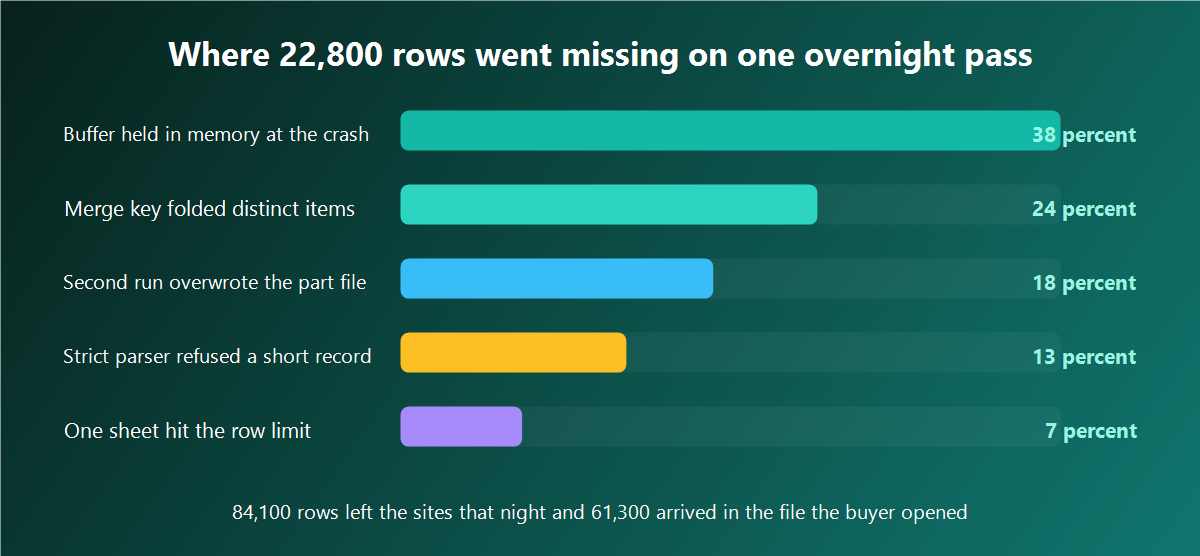
The 24 percent slice on that chart is a key that was too broad. I had deduped on site plus title_norm, and a retailer selling one jacket in 6 colours writes the same title 6 times, so the merge kept one and dropped 5 real products. The count still looked healthy because the drop was spread evenly. I now run a check after every merge: the count of distinct sku values per site against the site's own category totals, allowing 2 percent of drift before I go looking.
Retries are the honest source of duplicates and the easiest to verify. On the pass in the chart, 4,700 rows folded from retries after timeouts, which matched the retry counter in the run log to within 40 rows. When the folded count and the retry count disagree by a wide margin, my merge key has started folding something I never asked it to touch.
Incremental exports without rewriting the master
Reading the master file, appending today's rows and writing it back is the pattern that breaks quietly. It holds two copies of everything in memory, it takes longer every night, and a crash during the write leaves a truncated master with no backup.
My layout has three levels and never rewrites anything in place. Each run writes its own dated part files. A merge step folds the parts for a day into one day file. A rollup builds the delivered xlsx from day files whenever somebody asks, and the xlsx is disposable because every byte in it can be rebuilt from the parts.
import os, tempfile

def atomic_write(path, write_fn):
    d = os.path.dirname(path) or "."
    fd, tmp = tempfile.mkstemp(dir=d, suffix=".tmp")
    os.close(fd)
    try:
        write_fn(tmp)
        with open(tmp, "rb") as fh:
            os.fsync(fh.fileno())
        os.replace(tmp, path)                # atomic on the same filesystem
    finally:
        if os.path.exists(tmp):
            os.remove(tmp)
os.replace is the piece that makes an interrupted rollup harmless. The reader either sees the previous complete file or the new complete file, and a half written file never carries the name anybody reads. The 18 percent slice on the chart above was a second run writing over the first run's part file, and naming parts with the run id ended that class of loss on the same evening.
The watermark for an incremental pass is a run id, not a timestamp comparison. I store the last completed run id per site, and the next pass collects everything the queue holds and tags it with a new id. Comparing timestamps across machines with drifting clocks produced a 40 minute window of rows that neither pass claimed, and I spent an evening looking for a network fault that did not exist.
For nightly passes that have to finish inside a window I take private addresses built for scraping, since a pass that stalls halfway pushes the merge past the delivery time and the buyer opens yesterday's numbers. I keep server side addresses on owned hardware so the rate per address stays a figure I set in advance, and the run length holds steady from night to night, which is what makes an incremental schedule work at all.
Empty, absent and zero are three different states
A hole in a cell can mean the field was not in the response, or the field was there and held nothing, or the value really is zero. Collapsing all three into an empty cell destroys information that the buyer needs, and it is the most common thing I fix in other people's files.
My convention is short. An absent field writes an empty cell and a marker in field_flags. A present but empty field writes an empty cell and a different marker. A real zero writes 0. The flags column is a compact string like price:absent;stock:unparsed, and it is the first column I filter on when a number looks wrong.
The 13 percent slice of lost rows on that chart came from a parser that raised on any record missing a required field. It was doing what I told it to. It was also discarding every product that had no rating yet, which on a fresh catalogue was 11,000 items in one night. A record with a hole in it is still a record, and the hole is a fact worth storing.
There is a second place where the three states get flattened, and it lives in the reading step. Pandas treats NA, null, None, n/a and a dozen other strings as missing values on read. Both keep_default_na=False and na_filter=False from the merge function above turn that off, and after them a string reaches the sheet as the string the site wrote.
Writing back out has a matching setting. A None in a dict becomes an empty cell through restval in the CSV writer, and openpyxl writes None as a genuinely empty cell. Writing the four character text None into a sheet is what happens when a row goes through str() on the way, and 60 rows of it in a delivered file is the kind of detail that costs the next contract.
Surviving an interrupted run, and the checks before the file goes out
A long pass will be interrupted. Mine have died to a full disk, an OOM kill, a laptop lid and a power cut, and the design question is only how much a death costs.
The row ledger answers it. Before the collector touches a URL it writes a queued line to a state file. After the record is written and flushed it writes a done line. Resuming reads the ledger, subtracts done from queued, and hands the difference back to the queue.
def ledger_pending(state_path, all_urls):
    done = set()
    with open(state_path, "r", encoding="utf-8") as fh:
        for line in fh:
            state, _, url = line.rstrip("\n").partition("\t")
            if state == "done":
                done.add(url)
    return [u for u in all_urls if u not in done]
That is 8 lines and it turned a dead run from a lost night into a 20 minute continuation. The ledger is append only, it is flushed on the same counter as the part file, and it lives beside the parts so a whole run directory can be copied to another machine and resumed there.
The reconciliation table is the last gate before anything leaves my hands. Five counters, five differences, and every difference has to have a name.
| Counter | My last pass | Difference | What a gap here means |
|---|---|---|---|
| URLs queued | 86,940 | starting figure | the queue built from the site maps |
| Responses with status 200 | 84,310 | 2,630 | blocks, timeouts and genuinely dead pages |
| Records parsed | 84,100 | 210 | pages that changed shape, listed by site |
| Rows in the part files | 84,100 | 0 | any gap here is a writer that lost buffered rows |
| Rows after the merge | 79,400 | 4,700 | retries folding, matched against the retry counter |
The fourth line is the one I watch. Records parsed and rows written have to agree exactly, because anything between them is a row that existed in memory and never reached a disk. On the night I lost 8,700 rows to a crash, that line disagreed by 8,700 and named the failure before I had finished reading the log.
The 2,630 gap on the second line is worth its own attention, since a page answering with a block message still parses to zero rows and looks like an empty category. I run collection through steady exits for long collection passes so a mid pass block does not manufacture a hole that reads as real data, and I pin IPv4 addresses assigned per worker so a site that starts answering differently can be traced to one exit in one query against exit_id. Where the collector runs from a scheduler I use SOCKS5 endpoints for the collector process, since the tunnel carries the session for a whole site walk and the exit column stays meaningful. For a schedule that runs every night I keep a monthly rental for the pool so the same addresses show up at the same sites, and unmetered traffic across the pass keeps the last hour running at the same rate as the first.
Four checks run on the finished file, and they take 6 minutes together. Row count against the reconciliation table. Column count and header order against the declared list. A read back of the delivered xlsx with 12 hand picked rows compared field by field against the source pages. And a distinct count of sku per site against the previous pass, where a swing above 5 percent stops the delivery until I know why.
That last check is the one that has caught the most. A site changing its pagination, a category going out of the queue, a selector matching a promotional block, they all show up as a count that moved without a reason. Where the collector itself needs tuning for a site that answers differently under load, A-Parser jobs that write table files hand back per task counts I can drop straight into the same reconciliation table without writing a reporting layer.
The distance from a response to a cell is short and it has 5 places to lose things. Write rows as they exist, state every type yourself, keep the raw string next to the parsed value, dedupe on the key that matches what a row means, and count at every stage so a gap names its own cause. My delivered file and my collector log now agree to the row, and the passes that follow start from a number I trust.
More from this series: scraping with Python without getting blocked and collecting map listings at scale.